
How to Recycle Old Point-of-Sale Hardware Safely
For safe point of sale recycling, start by inventorying retired checkout computers and back-office server components. Keep them in a secure area until their drives and other data-bearing parts are sanitized or destroyed. Then have the hardware assessed for reuse, resale, or electronics recycling. Keep records of each asset and its final disposition so you can show what happened to it.
That order matters: recycling hardware before protecting its data can turn a routine upgrade into a security risk. It can also mean scrapping equipment that still has value.
I’m Mike Haden, founder of Innovative IT Solutions. For 14 years, I’ve helped businesses manage retired IT equipment through secure processing, resale, and responsible recycling—the same work behind safe point of sale recycling.
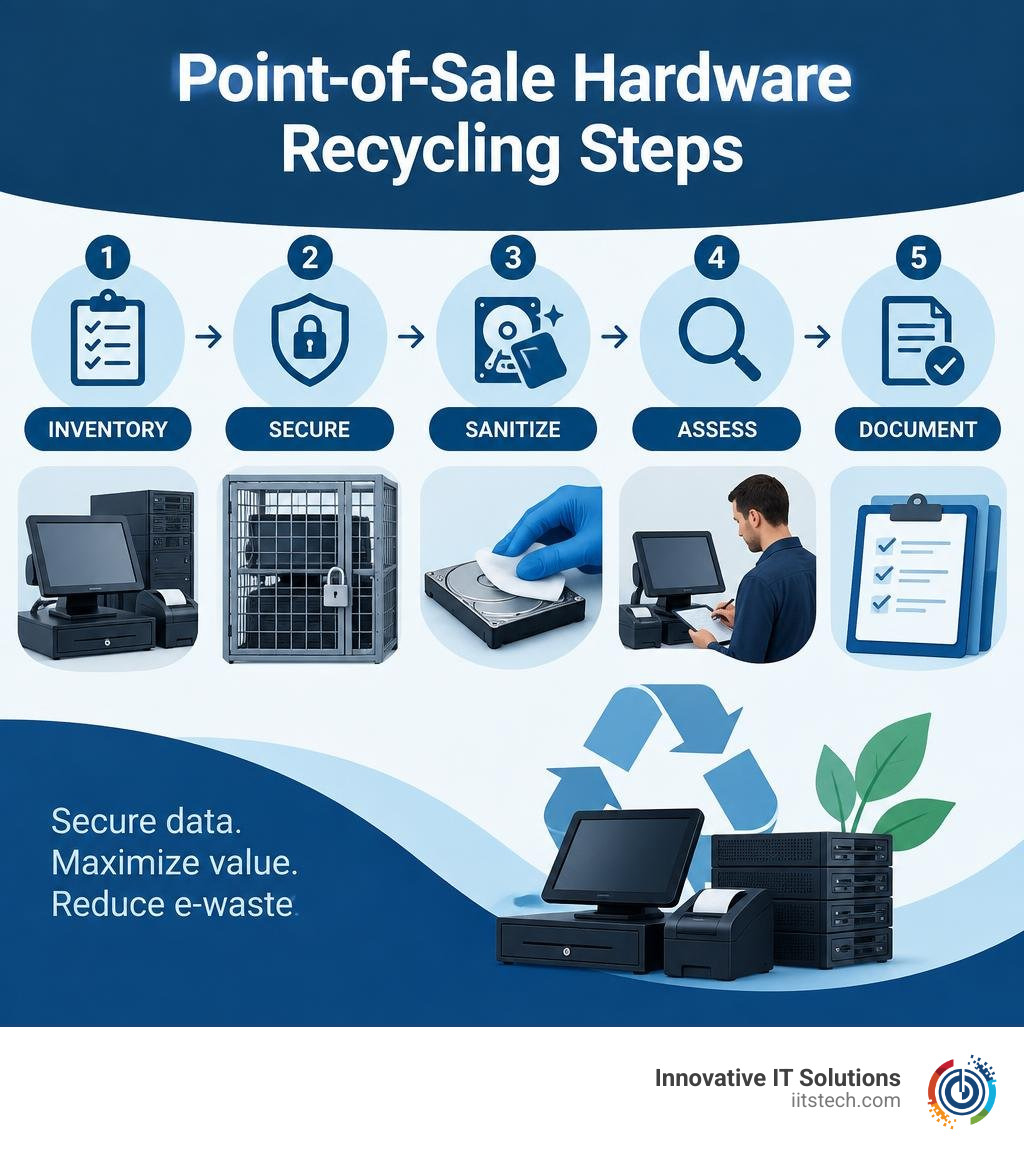
Related planning topics include refurbished POS hardware and used point of sale systems.
Understanding Point of Sale Recycling for Retail and Enterprise Terminals
Every retail checkout counter relies on business IT infrastructure: dedicated terminal PCs, embedded checkout computers, and back-office inventory servers. When modernizing retail lanes, enterprise operators face large volumes of obsolete computers and server components. Simply tossing these devices into a dumpster is not just an environmental problem—it exposes businesses to compliance penalties and data liability.

Point of sale recycling bridges the gap between hardware retirement and environmental stewardship. Through comprehensive IT equipment recycling services, decommissioned commercial computers and servers are systematically triaged to recover usable components, reclaim precious commodities, and guarantee zero-landfill diversion.
Evaluating Reusable Hardware vs. Point of Sale Recycling Streams
Not every retired POS workstation belongs in the scrap shredder. Many enterprise-grade terminal mainboards, server boards, power supplies, and RAM modules retain significant functional utility. When retiring an IT fleet, applying structured triage protocols ensures your organization captures residual value before raw material processing.
A comprehensive guide to used POS systems can help inventory managers distinguish between business-grade computers suitable for secondary markets and those destined for material breakdown.
| Disposition Tier | Hardware Condition | Typical Components | Economic & Environmental Benefit |
|---|---|---|---|
| Resale / Secondary Market | Working units less than 4 years old; complete diagnostic pass | Enterprise POS PCs, server blade nodes, functional storage devices | Highest residual capital recovery; extends device lifecycle |
| Component Refurbishment | Cosmetic damage or minor component failure | Power supplies, daughterboards, memory modules, chassis | Harvests spare parts to extend existing fleet operations |
| Commodity Scrap & Recovery | Non-booting boards, obsolete architectures, physically damaged units | Shredded PCBs, copper wiring, aluminum heat sinks, gold-plated pins | Zero-landfill raw material reclamation for circular manufacturing |
Hardware Triage: From POS Computers to Back-Office Servers
A standard business IT retirement project includes multiple computer and server assets, each carrying unique recycling and security requirements:
- Terminal PCs & Back-Office Servers: These house primary CPUs, solid-state drives, RAM, and gold-flashed circuit boards. They require strict data sanitization before material recovery.
- Storage Media: Hard drives, M.2 SSDs, and removable flash media can retain transaction logs, operating system images, and network configuration data.
- Server Components: RAID cards, memory modules, power supplies, processors, and network interface cards should be tested for reuse before being routed to commodity recovery.
Security and resale considerations for used POS terminals apply when a terminal functions as a business computer with onboard storage or configuration data.
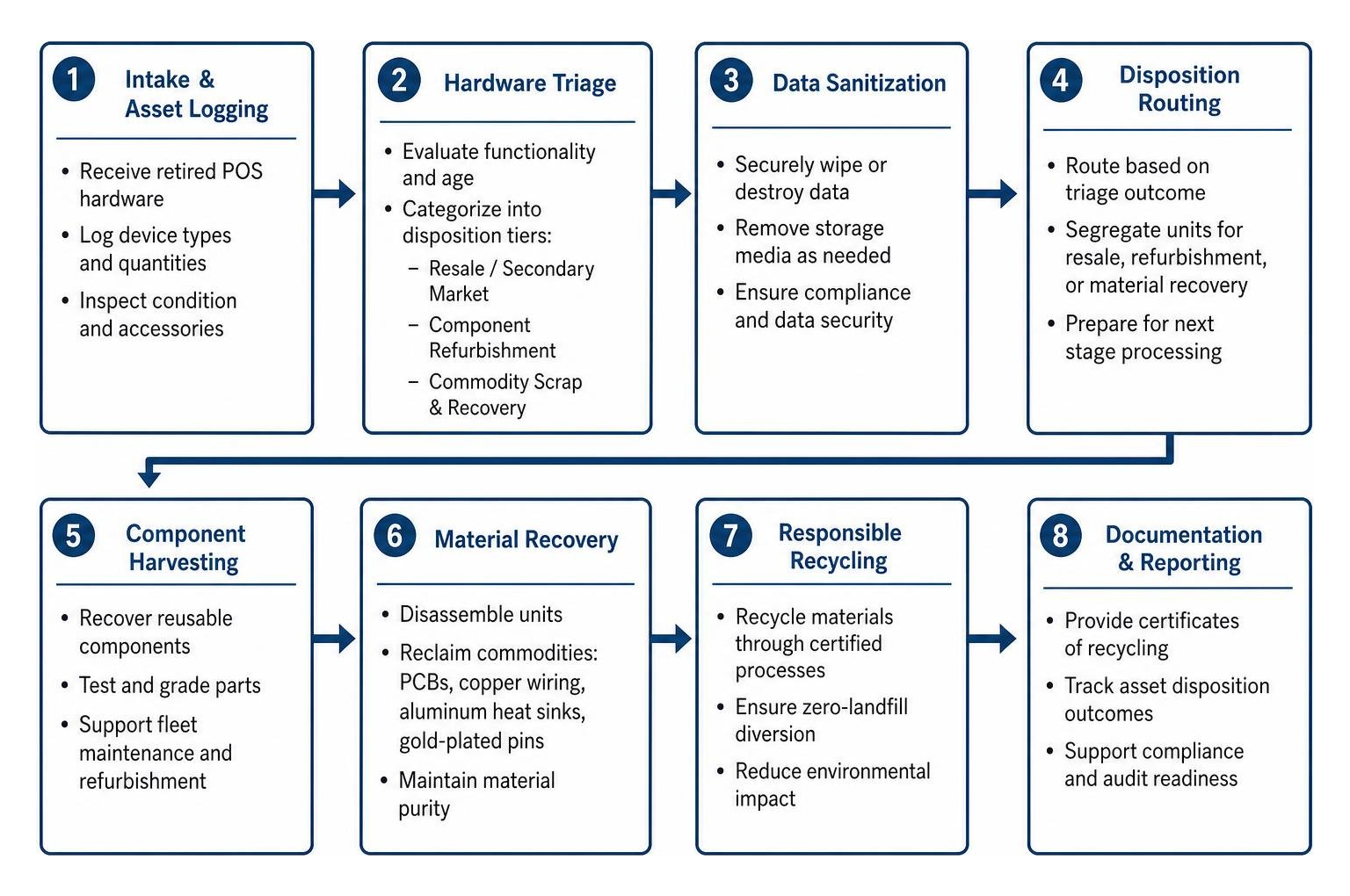
Step-by-Step Guide to Decommissioning and Scrapping Old POS Computers and Servers
Decommissioning commercial POS computers and back-office servers requires a controlled teardown process to protect internal personnel, safeguard proprietary network configurations, and preserve material purity.
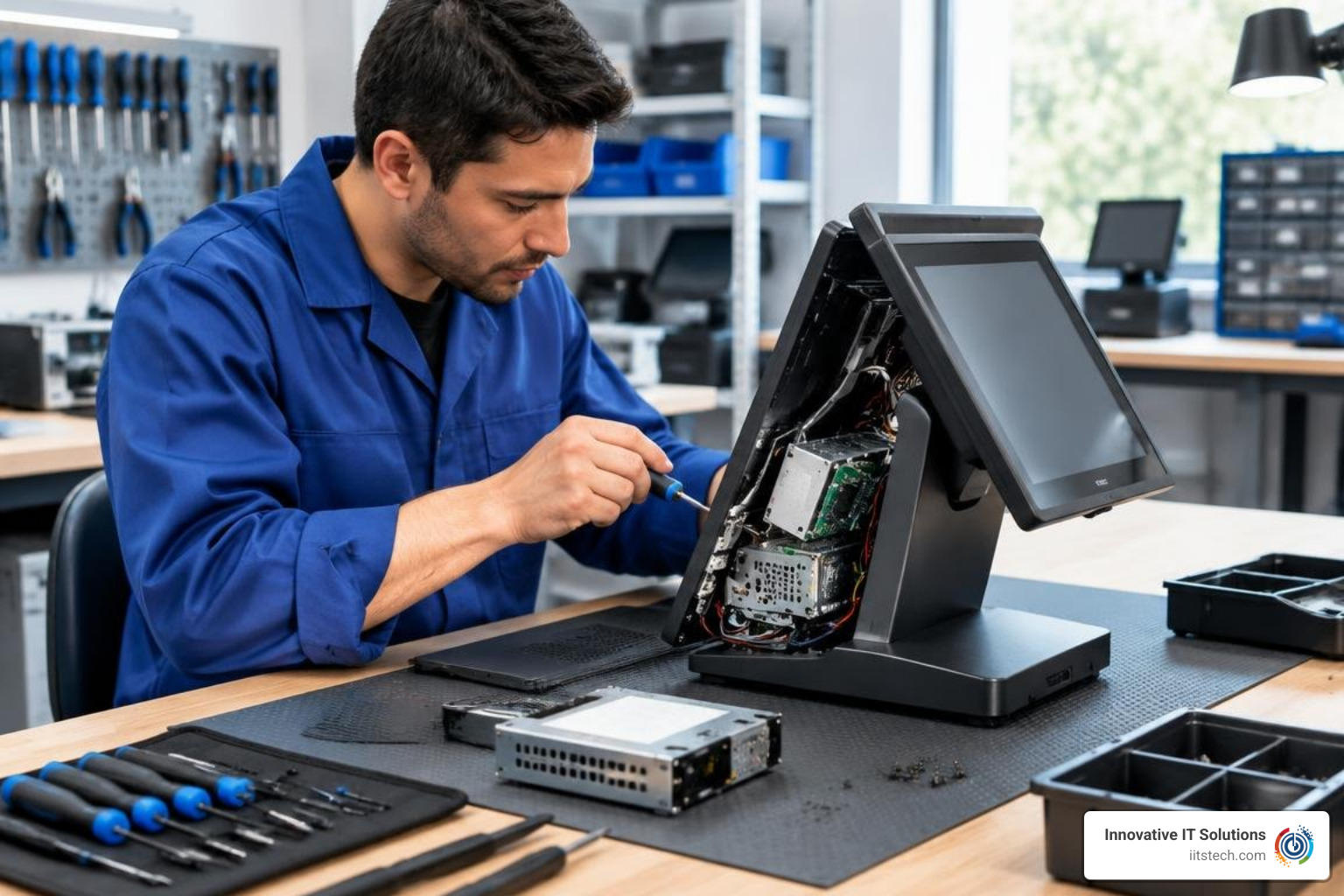
Whether you are retiring a small group of checkout PCs or processing a fleet of multi-lane supermarket terminal computers, follow these core steps:
- System Isolation & Power Decoupling: Completely disconnect the terminal computer or server from commercial AC power lines, uninterruptible power supplies (UPS), and Power-over-Ethernet (PoE) switches.
- Cable Segregation: Detach network patch cables, display leads, external storage connections, and power cords. Bundle copper wiring separately for high-yield commodity reclamation.
- Data-Bearing Media Extraction: Remove internal hard drives, M.2 SSDs, micro-SD cards, and other storage media before any chassis teardown.
- Mechanical Enclosure Disassembly: Separate outer computer enclosures from internal steel chassis trays, aluminum heat sinks, and printed circuit boards (PCBs).
Sanitizing Sensitive Business Data Before Hardware Scrapping
Data security is the most critical phase of point of sale recycling. Even after an operating system reinstall, residual transaction logs, offline batch data, and network security keys can linger on storage drives.
Our sanitization processes align strictly with the National Institute of Standards and Technology (NIST) Special Publication guidelines. Following rigorous media sanitization standards ensures data-bearing media undergoes complete multi-pass cryptographic erasure or physical destruction before entering any scrap stream.
- NIST 800-88 Clear: Logical sanitization across all user-addressable storage locations using specialized data erasure tools.
- NIST 800-88 Purge: Executing low-level ATA Secure Erase commands or cryptographically shredding encryption keys on self-encrypting solid-state media.
- NIST 800-88 Destroy: Industrial mechanical shredding of magnetic platters and flash memory chips to a cross-cut size of 2mm or smaller, rendering data recovery physically impossible.
Material Separation: Precious Metals, Plastics, and Circuit Boards
Once drives are securely sanitized or destroyed, the physical computer or server undergoes granular material sorting to support circular manufacturing. Local initiatives, such as municipal e-waste repurposing initiatives, emphasize the importance of keeping heavy metals and complex plastics out of regional landfills.
- High-Grade Printed Circuit Boards: Mainboards from enterprise POS computers and back-office servers are rich in gold edge-connector plating, silver solder joints, and palladium capacitors.
- Copper and Aluminum: Server wiring harnesses, heat sinks, and power supply components yield clean non-ferrous metals that are melted down for industrial reuse.
- Industrial Plastics: Computer housings made from flame-retardant polycarbonate and ABS plastics are ground into uniform pellets for remanufacturing.
- Battery Segregation: Lithium coin-cell BIOS batteries and uninterruptible power units are segregated to prevent fire hazards and ensure safe chemical recycling.
Integrating Reverse Logistics for Retired POS Computers and Servers
Point of sale recycling is not limited to a single store location. Multi-site retailers often need a reverse logistics plan that moves retired checkout computers, back-office servers, and storage media from branch locations to a secure processing facility.
When replacements are planned, guidance for checkout lane hardware upgrades can help retailers coordinate deployment schedules with the removal of old business IT assets.
Centralized Collection vs. Store-by-Store Processing
Retail organizations typically manage retired POS computers using one of two collection models:
- Centralized Consolidation: Stores palletize retired terminal PCs, server components, and storage media for shipment to a regional facility. This approach improves chain-of-custody control and can reduce freight costs when equipment is processed in bulk.
- Store-by-Store Processing: A certified ITAD partner collects hardware directly from each location, records serial numbers, removes data-bearing media, and routes assets for resale, refurbishment, or recycling.
Connecting Asset Records with ITAD Documentation
The most reliable recycling programs connect internal asset records with ITAD documentation. Each retired computer or server should be tracked by serial number, asset tag, location, drive status, and final disposition. That documentation helps operations, IT, and compliance teams confirm that business hardware was processed securely and responsibly.
Compliance, Certifications, and Maximizing Scrap Value
Navigating corporate electronics recycling requires rigorous compliance tracking. Discarding commercial IT assets without certified documentation can lead to severe environmental fines, brand damage, and intellectual property exposure.
Before offloading hardware, review the total cost risks of proprietary POS computers to understand the hidden costs of managing closed-ecosystem retail technology.
Regulatory Compliance and Environmental Standards in Point of Sale Recycling
Commercial IT disposal must comply with strict environmental and privacy regulations:
- EPA Compliance & Zero-Landfill Policies: Certified disposition partners ensure that 100% of non-reusable electronics are converted into scrap commodities, keeping toxic elements like lead, mercury, and cadmium out of landfills.
- Audit Trails & Documentation: Retailers receive comprehensive Certificates of Destruction and Certificates of Data Sanitization detailing serial numbers, asset tags, drive sanitization methods, and final material outcomes.
- ESG & Scope 3 Reporting: Documented e-waste diversion metrics provide verifiable sustainability data for corporate Environmental, Social, and Governance (ESG) disclosures.
Extracting Maximum Value from Legacy Terminal Scrap
Maximizing the financial return on decommissioned POS computer and server fleets depends on volume, material sorting, and logistical efficiency:
- Bulk Consolidation: Consolidating terminal computers and server hardware across multiple store locations into single palletized shipments reduces freight expenses and increases per-pound commodity yields.
- Presorted Commodity Streams: Separating power cords, steel chassis parts, terminal PCs, server boards, and storage devices before final refining maximizes recovery payouts.
- Component Harvesting: Retaining reusable modular sub-assemblies—such as DDR3/DDR4 RAM sticks, processors, server power supplies, and standard mounting rails—helps offset the procurement costs of new retail IT deployments.
Frequently Asked Questions About Point of Sale Recycling
How do businesses securely wipe sensitive data from retired POS computers before recycling?
Customer data, network credentials, and transaction histories must be sanitized according to NIST SP 800-88 standards. This involves running certified erasure software across internal storage drives, executing cryptographic key destruction on encrypted solid-state media, or physically shredding drives into miniature fragments before circuit boards are processed for scrap.
What components of a POS computer or server hold the highest scrap and recycling value?
The highest commodity value resides in the primary motherboard and server board assemblies, which contain gold-plated contact fingers, silver traces, and palladium chip capacitors. Copper wiring harnesses, heavy aluminum heat sinks, processors, memory modules, and functional power supply modules also hold significant scrap and secondary-market recovery value.
Can retailers refurbish old POS computers instead of recycling them as scrap?
Yes. If an enterprise POS computer has no unrepairable motherboard faults, it can frequently be refurbished. Upgrading internal storage to new solid-state drives, refreshing system memory, replacing failed power supplies, and reinstalling approved operating system images allows legacy POS computers to serve reliably in secondary lanes, test environments, or secondary market resale.
Conclusion
Upgrading retail technology should never come at the expense of corporate data security or environmental responsibility. By implementing structured point of sale recycling protocols—from initial hardware inventory and NIST-compliant drive sanitization to granular material sorting and certified commodity recovery—your enterprise can turn obsolete IT clutter into sustainable scrap.
At Innovative IT Solutions, we provide comprehensive IT asset disposition (ITAD) services for businesses across Oklahoma City and beyond. Our zero-landfill, EPA-compliant processes support complete data destruction, transparent audit trails, and maximum asset value recovery for retired computers, servers, and enterprise retail IT infrastructure.


