
How to Score Cheap and Reliable Used POS Systems for Your Business
Why Smart Buyers Choose Used Point of Sale Systems Over New
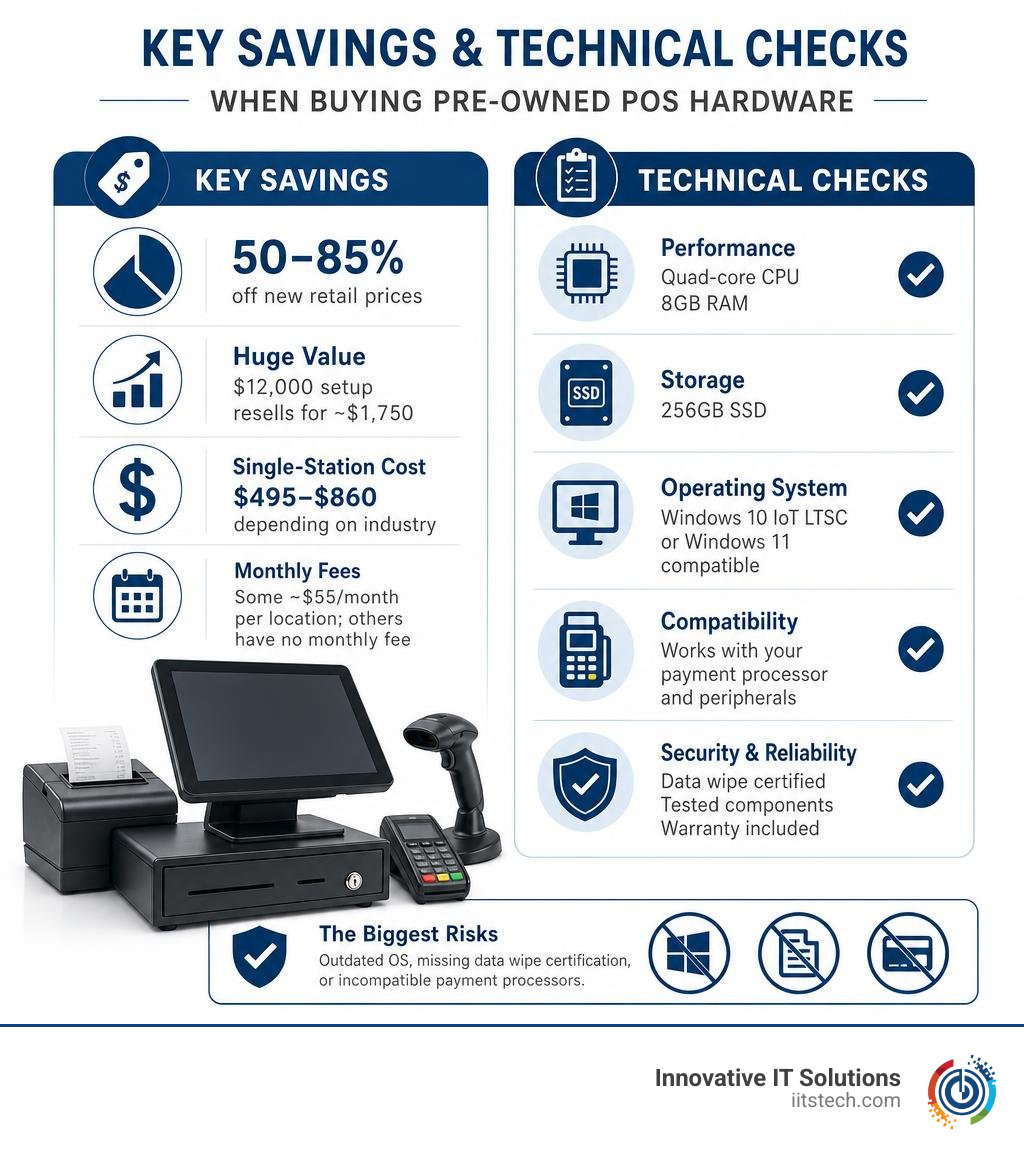
Used point of sale systems can cut your hardware startup costs by 50% to 85% compared to buying new — without sacrificing reliability or functionality.
Quick answer: What you need to know before buying a used POS system
| Question | Quick Answer |
|---|---|
| How much can I save? | 50–85% off new retail prices (e.g., a $12,000 restaurant setup resells for ~$1,750) |
| What’s included in a bundle? | Touchscreen terminal, receipt printer, cash drawer, barcode scanner, card reader |
| What specs should I look for? | Quad-core CPU, 8GB RAM, 256GB SSD, Windows 10 IoT LTSC or Windows 11 compatible |
| What does a single-station system cost? | $495–$860 depending on industry (retail, restaurant, hotel) |
| Is there a monthly fee? | Some setups charge ~$55/month per location; others (e.g., QuickBooks POS) have no monthly fee |
| Where’s the biggest risk? | Outdated OS, missing data wipe certification, or incompatible payment processors |
Setting up a new checkout system is expensive. A single new retail POS station can run well over $2,500 before you add software and peripherals. For small businesses and lean operations, that’s a serious budget hit — especially when lightly used commercial hardware performs just as well at a fraction of the price.
The used business hardware market has matured significantly. Today, refurbished POS terminals regularly come with verified specs, tested components, and short-term warranties. Whether you’re opening a restaurant, a boutique hotel, or a multi-station grocery store, there’s a pre-owned setup built for your environment.
I’m Mike Haden, Founder of Innovative IT Solutions — an R2v3-certified IT Asset Disposition company that has processed and remarketed over a million pieces of enterprise IT equipment, including used point of sale systems, with rigorous testing and data sanitization at every step. That background gives us a clear-eyed view of what makes refurbished POS hardware a smart buy — and what to watch out for.
Used point of sale systems word list:
Benefits and Savings of Buying Used Point of Sale Systems
When outfitting a brick-and-mortar storefront or hospitality venue, cash flow is king. Choosing used point of sale systems over brand-new equipment provides an immediate financial cushion. Instead of tying up thousands of dollars in capital expenditure before processing your first customer payment, buying refurbished allows you to redirect funds into marketing, inventory, or operational reserves.
The primary benefit is rapid return on investment (ROI). Commercial POS hardware is engineered to endure brutal, high-volume retail and dining environments. Unlike consumer electronics, enterprise-grade POS terminals feature heavy-duty metal chassis, moisture-resistant touchscreen glass, and fanless cooling assemblies designed to run 14 hours a day for years. When enterprise corporations downsize or upgrade their technology stack, perfectly functional systems hit the secondary market. Real-world secondary market listings show full commercial setups—originally valued over $12,000 when purchased new—selling for around $1,750 after just a few months of light operational use.
To put the financial and operational trade-offs into perspective, let’s examine how new and pre-owned checkout setups compare across key metrics:
| Metric | New POS Hardware | Refurbished / Used POS Hardware |
|---|---|---|
| Upfront Cost Per Station | $1,500 – $3,500+ | $495 – $860 |
| Depreciation Rate | Drops 40–60% in Year 1 | Minimal (value already stabilized) |
| Hardware Lifespan | 5 – 7 Years | 3 – 5+ Years remaining |
| Software Flexibility | Often tied to proprietary SaaS lock-in | Open desktop architecture or flat-rate software |
| ROI Timeline | 12 – 24 Months | 2 – 6 Months |
Evaluating these trade-offs comes down to understanding your business cycle. For a deeper dive into procurement strategies, check out our guide on Refurbished Vs New It Equipment Making The Smart Procurement Choice.
Best Business Types for Used Point of Sale Systems
While virtually any merchant can benefit from lower hardware costs, specific business models extract maximum value from pre-owned checkout systems:
- Retail Stores & Specialty Boutiques: Single-station retail environments benefit immensely from standalone pre-owned desktop configurations. A single station retail system priced around $845 provides complete barcode scanning, inventory lookups, and cash handling at a fraction of full price.
- Full-Service & Quick-Service Restaurants: Hospitality demands durability. Bundles featuring fluid-resistant touchscreen monitors, kitchen video system (KVS) controllers, bump bars, and receipt printers give restaurants enterprise capabilities without enterprise debt. A single-station restaurant system can be secured for approximately $860, while standalone units are available around $495.
- Boutique Hotels & Lodging: Hotels require seamless coordination between front-desk reservation management and ancillary retail or lounge sales. Dedicated single-station hotel POS bundles average around $785, giving property owners robust transaction processing without massive overhead.
- Beauty Salons & Spas: Salons thrive on appointment tracking and simple retail checkout. Complete salon setups featuring 15-inch touchscreens can be acquired for roughly $749—down from original price points exceeding $1,800.
- Multi-Station Grocery & Convenience Stores: High-volume grocers needing multi-lane configurations can find 2-station grocery bundles around $1,195 (down from original retail prices over $4,300), enabling fast lane throughput on a startup budget.
Evaluating Hardware Components and Technical Specs
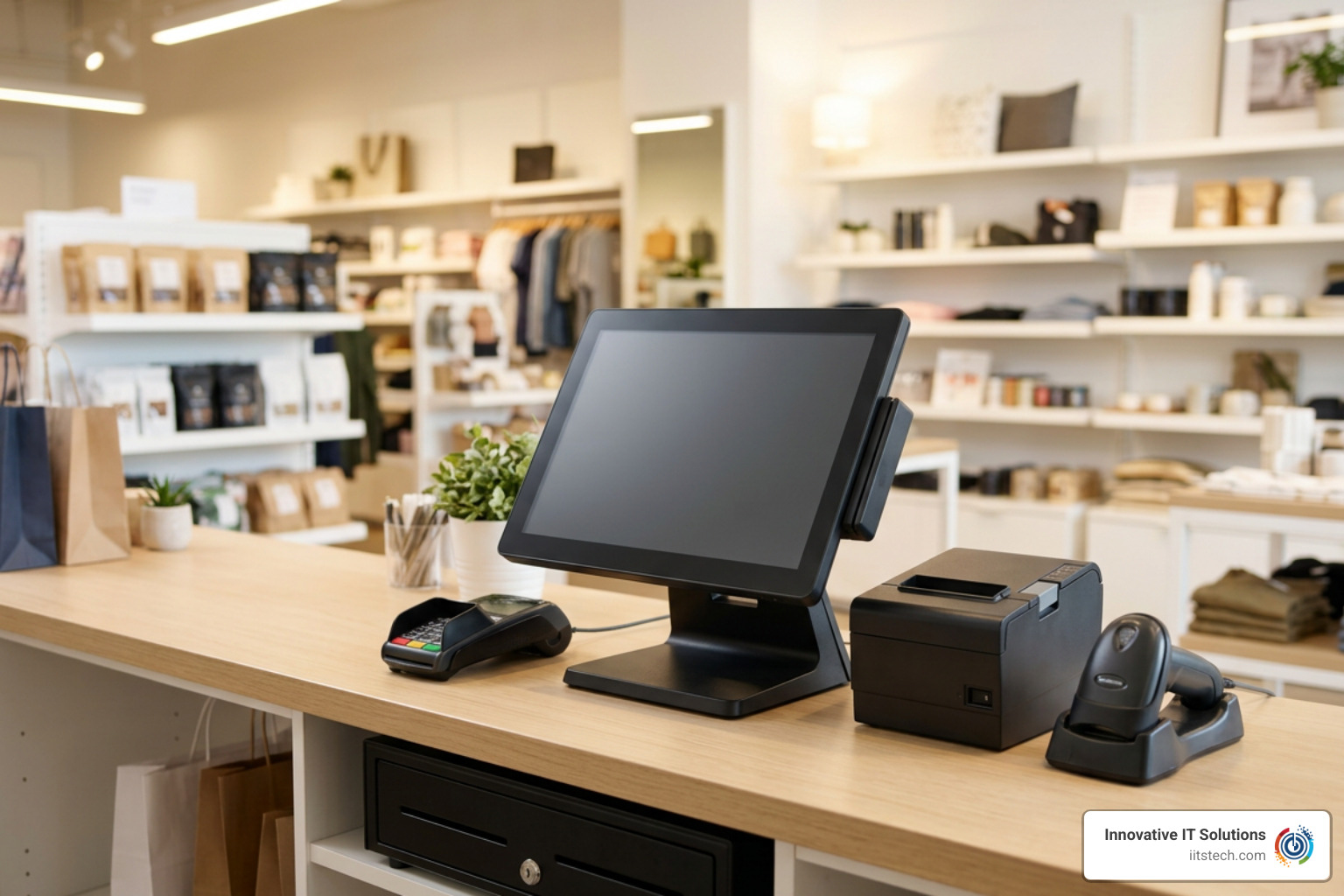
Scoring a deal on used point of sale systems requires looking beyond the outer plastic casing. You need to verify that the internal components offer enough computing overhead to process sales quickly without freezing during a weekend rush. For a comprehensive overview of hardware specifications, read our A Z Guide To Used Pos Systems.
When auditing internal specs, focus on four baseline hardware standards:
- Central Processing Unit (CPU): Aim for at least a Quad-Core Intel processor running at 2.0 GHz or higher (such as an Intel Core i5). Avoid legacy single-core or low-end Atom chips, which struggle with modern payment security protocols.
- System Memory (RAM): 4GB RAM is the absolute functional minimum for basic single-app POS software, but 8GB to 16GB RAM is strongly recommended if your checkout terminal runs background inventory syncing, card processing, and web apps simultaneously.
- Storage Drive: Never buy a used POS terminal powered by a traditional mechanical hard disk drive (HDD). Ensure the unit contains a Solid-State Drive (SSD) with at least 256GB capacity. SSDs launch applications instantly and withstand shop floor vibrations far better than spinning magnetic disks.
- Operating System & Windows Compatibility: Verify the system runs Windows 10 IoT Enterprise LTSC (Long-Term Servicing Channel) or supports an upgrade path to Windows 11. Windows 10 LTSC is favored in commercial settings because it receives long-term security updates without forcing intrusive feature updates during business hours.
Essential Components in Used Point of Sale Systems
A complete POS station relies on interconnected peripherals working in harmony. When evaluating pre-owned station packages, ensure the following core hardware components are included and verified working:
- All-in-One Touchscreen Display: High-grade commercial monitors (typically 15-inch to 17-inch) with resistive or capacitive touch capabilities allow cashiers to navigate menus rapidly.
- Thermal Receipt Printers: Quiet, high-speed thermal printers avoid expensive ink replacements. Verify the printer features standard RJ12 cash drawer kick-out ports. If you are upgrading existing checkout lanes, explore our analysis on Refurbished Receipt Printers Trash Or Treasure For Your Business.
- Auto-Open Cash Drawers: Heavy-gauge steel drawers route connection signals directly through the thermal receipt printer to trigger automatic opening upon cash tender.
- Barcode Scanners (1D/2D): Omnidirectional or handheld laser scanners reduce checkout times and eliminate manual price entry errors.
- Magnetic Stripe Readers (MSR) & EMV Card Swipes: Encrypted card readers mounted to the monitor bezel enable fast swipe and chip transactions.
Software, Payment Gateway, and Accounting Integration
Hardware is only half the battle; it must communicate effortlessly with your management software. Pre-owned commercial POS systems excel because they typically run on open architecture, allowing integration with standard software ecosystems:
- QuickBooks Integration: Off-lease retail bundles—like complete QuickBooks POS kits priced around $1,395—automatically synchronize daily sales, tax collections, and inventory tallies directly into your accounting books. This eliminates hours of manual data entry at closing.
- Property Management System (PMS) Sync: In hotel settings, front-desk POS terminals connect with room billing software via two-way APIs, enabling guests to post restaurant, spa, or gift shop charges directly to their room folio.
- OPOS Drivers & Payment Gateways: Ensure the refurbished terminals support OLE for Retail POS (OPOS) driver standards. OPOS compliance guarantees that peripherals like cash drawers, customer pole displays, and scale units work plug-and-play across diverse retail software packages.
- EMV & Contactless Compliance: Modern payment processors require EMV chip reader support and NFC capabilities for Apple Pay and Google Wallet. Verify that integrated PIN pads or terminals meet current PCI-DSS security guidelines.
Sourcing Channels, Warranty Standards, and Avoidable Pitfalls
Finding reliable used point of sale systems requires sourcing from reputable IT refurbishers rather than unverified peer-to-peer marketplaces. Reputable refurbishers inspect motherboards, refresh thermal paste, replace worn touch digitizers, and perform clean operating system installations.

When buying used IT equipment, avoid these common traps:
- Merchant Processor Lock-in: Some sellers offer dirt-cheap hardware that is hard-coded to a single payment processor with exorbitant processing fees. Ensure the hardware is unlocked and merchant-agnostic.
- Unsanitized Storage Drives: Discarded hardware from previous businesses must be wiped according to strict security protocols. Partnering with professional refurbishers ensures NIST 800-88 compliant data destruction. Learn why security matters in our detailed overview on It Asset Disposition Why Every Business Needs A Secure Itad Strategy.
- Inadequate Warranty Protection: Avoid “as-is” listings. Look for sellers offering a minimum 30-day return policy backed by a 6-month to 1-year hardware warranty on key components like computers, screens, and printers.
Off-Lease Desktop Terminals vs Cloud Tablet Subscriptions
Many business owners debate between purchasing off-lease commercial POS terminals or subscribing to modern tablet-based iPad POS systems. Both approaches have distinct structural trade-offs:
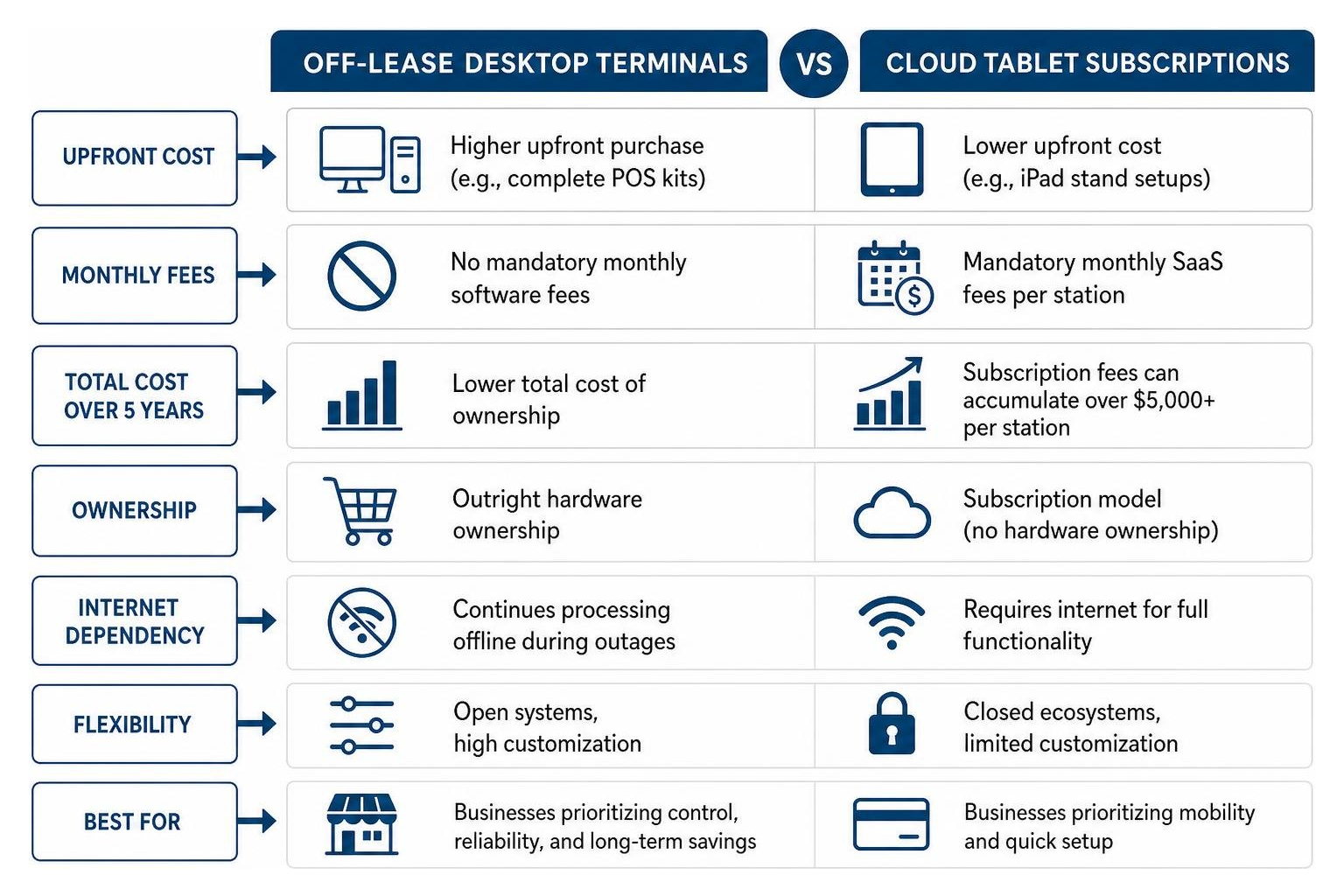
Off-lease commercial desktops offer outright hardware ownership. Kits like pre-owned QuickBooks bundles require an upfront cost but carry zero mandatory monthly software fees, saving thousands over a multi-year horizon. Furthermore, local desktop terminals continue processing transactions offline during internet outages.
In contrast, cloud tablet solutions feature low upfront hardware costs (starting around $700–$800 for basic iPad stands), but incur mandatory monthly SaaS subscription fees ranging from $15 to $89+ per station every month. Over five years, subscription fees can quietly accumulate to over $5,000 per station. For a closer look at selecting terminal hardware safely, review Used Pos Terminals A Guide To Saving Money Safely.
Frequently Asked Questions About Used POS Systems
How much can I save buying a used POS bundle compared to new?
Buyers typically save between 50% and 85% off standard retail pricing. For example, enterprise restaurant bundles that cost over $12,000 when brand new can be purchased secondhand for roughly $1,750. Single-station retail and restaurant setups often cost between $495 and $860 refurbished, compared to $2,500+ for equivalent new hardware.
How do I check if a pre-owned POS system supports Windows 11?
Check the system’s processor generation and TPM (Trusted Platform Module) version. Windows 11 requires an 8th Generation Intel Core processor or newer, alongside TPM 2.0. If a used POS terminal uses an older 6th or 7th Gen Intel processor, verify that it runs Windows 10 IoT Enterprise LTSC, which offers long-term security updates and support without forcing a Windows 11 upgrade.
What warranties and return policies should I look for from used POS sellers?
Look for reputable equipment vendors that offer a 30-day money-back guarantee combined with a 6-month to 1-year hardware replacement warranty. Ensure the seller explicitly tests and certifies touchscreen digitizers, receipt printer thermal heads, and auto-open drawer mechanisms before shipping.
Conclusion
Outfitting your business with fast, reliable payment technology doesn’t require draining your capital reserves. Choosing high-grade used point of sale systems gives your business access to heavy-duty commercial computers, responsive touchscreens, and reliable peripherals at a fraction of original retail costs.
At Innovative IT Solutions in Oklahoma City, we specialize in complete IT asset disposition, rigorous hardware refurbishment, and certified data sanitization. We ensure every piece of pre-owned hardware meets strict commercial reliability standards before it reaches your storefront.
Ready to upgrade your checkout lanes while keeping your budget intact? Discover practical deployment strategies in our article on How To Upgrade Your Checkout Lane With Quality Refurbished Pos Hardware, or explore our store to buy tested commercial payment hardware today, such as the Ingenico Lane 8000 POS Terminal.


