
Why Savvy IT Managers Are Turning to Refurbished POS Hardware
Refurbished POS hardware gives businesses a proven, cost-effective way to equip checkout lanes with enterprise-grade point-of-sale equipment — without the full price tag of new systems.
Quick answer: What is refurbished POS hardware?
| Question | Answer |
|---|---|
| What is it? | Business-grade POS terminals, receipt printers, cash drawers, and scanners that have been returned, inspected, cleaned, tested, and restored to working condition |
| How much can you save? | Typically 40-70% compared to buying new equipment |
| Is it reliable? | Yes, when sourced from certified refurbishers who test and warranty the hardware |
| Is it PCI compliant? | It can be — but always verify EMV and PCI DSS compliance before deployment |
| Who is it best for? | Retailers, restaurants, hospitality businesses, and enterprises managing multi-site rollouts |
Every year, businesses across retail and hospitality face the same problem: checkout lanes need upgrading, but new POS hardware is expensive. A full new setup can run into the thousands per station. Multiply that across dozens of locations, and the capital requirement becomes a serious obstacle.
That’s exactly why enterprise IT managers are increasingly looking at the secondary market. The global POS market is growing fast — from $22 billion in 2021 toward a projected $70 billion by 2029 — and a thriving refurbishment ecosystem has grown alongside it. Today, professionally refurbished systems deliver real performance at a fraction of the cost, with warranties and compliance documentation to back them up.
But sourcing quality refurbished POS equipment requires knowing what to look for — and what to avoid.
I’m Mike Haden, Founder and Director of Business Development at Innovative IT Solutions, where I’ve spent 14 years building an R2v3-certified IT Asset Disposition operation that has processed and remarketed over a million pieces of enterprise IT equipment, including refurbished POS hardware. That experience gives me a clear picture of what separates a smart procurement decision from a costly mistake — and I’ll walk you through exactly that in this guide.
What is Refurbished POS Hardware and How is It Processed?
When we talk about refurbished pos hardware, we are not talking about “used” or “as-is” equipment found on auction sites. There is a massive structural difference between a piece of hardware that is simply wiped down and resold, and one that goes through a professional, certified lifecycle restoration.
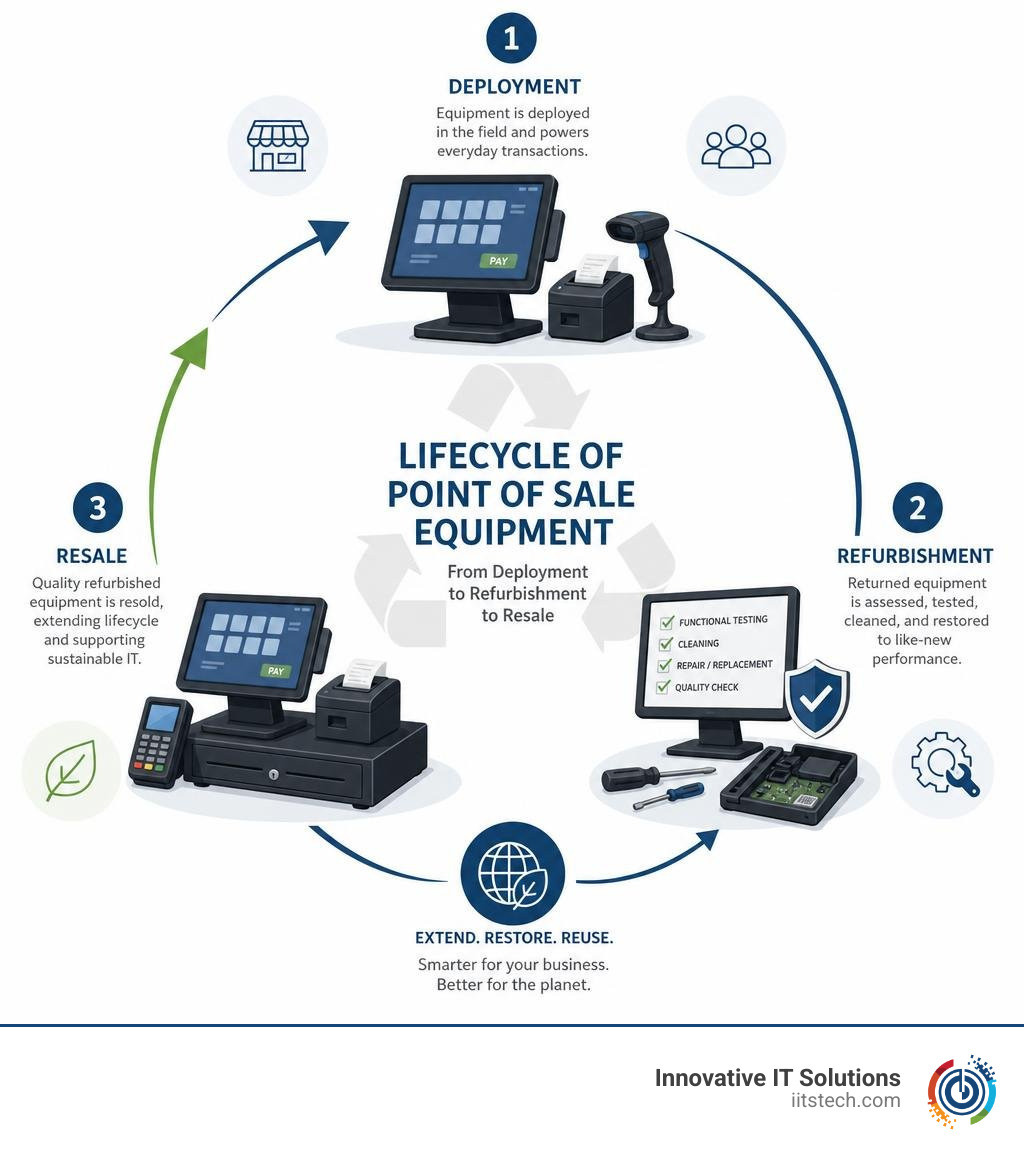
To build a reliable checkout lane, you need to understand the hardware lifecycle. Much of the high-quality refurbished inventory on the market comes from off-lease corporate contracts. Enterprises typically lease their POS hardware for 3 to 5 years. When those leases end, the equipment is returned in perfectly functional condition, simply because the corporate lease expired. This is where our team at Innovative IT Solutions steps in to transition these assets into our New & Refurbished IT Equipment inventory, extending their useful life and preventing premature recycling.
The Multi-Step Refurbishment Process
A professional refurbishment process is scientific, structured, and repeatable. When we process POS terminals, we don’t just verify that they turn on; we return them to like-new operational standards. If you are comparing procurement options, understanding this process is key to making the right choice, as detailed in our guide on Refurbished vs New IT Equipment: Making the Smart Procurement Choice.
Here is how a professional refurbishment process works:
- Disassembly: The POS terminal is disassembled down to its core components. This allows technicians to inspect internal boards, power connections, and routing cables for any signs of wear, corrosion, or heat stress.
- Deep Cleaning: Dust and residue are the primary enemies of retail electronics. Every component undergoes thorough cleaning, including the chassis, fan blades, and heat sinks.
- Diagnostic Testing: Technicians perform extensive hardware diagnostics. This includes stress-testing the CPU, checking RAM integrity, and running read/write tests on storage drives.
- Parts Replacement: Any component showing signs of degradation is replaced. For instance, mechanical hard drives are routinely replaced with brand-new Solid State Drives (SSDs), which drastically improves boot times and transaction processing speeds.
- Cosmetic Reconditioning: The exterior casing is cleaned, polished, and repainted if necessary to eliminate scuffs and scratches, ensuring the unit looks professional on your checkout counter.
Key Components of Refurbished POS Hardware Systems
A complete checkout lane relies on several interconnected hardware components working in perfect harmony. When upgrading your store, you can source the entire system as a refurbished bundle or purchase individual parts to build a hybrid setup.
- Touchscreen Terminals: The central hub of your checkout lane. Modern refurbished terminals feature high-resolution displays (often 15″ to 15.6″) with capacitive touch technology designed to withstand millions of taps.
- Receipt Printers: Thermal printers are highly durable because they do not use ink. Refurbished thermal receipt printers are cleaned, printheads are tested for clarity, and cutter mechanisms are calibrated to prevent paper jams.
- Cash Drawers: These heavy-duty steel drawers are tested for lock security, spring responsiveness, and seamless integration with the receipt printer or terminal interface.
- Barcode Scanners: Handheld or presentation scanner-scales are calibrated and tested to ensure rapid, accurate barcode reads.
- Customer Displays: Rear-facing screens allow customers to see their transaction totals in real-time, boosting transparency.
If you are looking to upgrade your payment terminal specifically, you can Upgrade your checkout lane with the Ingenico Lane 8000 POS, which supports advanced EMV and contactless payments. For compact or mobile-friendly setups, options like the PAX E600 Smart Terminal or the robust Ingenico Desk 3500 provide excellent flexibility. You can also source complete, certified hardware setups through specialized ITAD partners.
The Financial and Environmental Benefits of Refurbished POS Systems
Choosing refurbished hardware isn’t just about cutting corners; it’s a strategic business move that directly impacts your balance sheet and your corporate environmental footprint.
| Feature | New POS Hardware | Refurbished POS Hardware |
|---|---|---|
| Upfront Cost | High ($1,200 – $2,500+ per station) | Low to Moderate ($400 – $900 per station) |
| Typical Lifespan | 5 to 7 Years | 4 to 6 Years (with upgrades like SSDs) |
| Warranty Included | 1 to 3 Years | 90 Days to 2 Years (vendor dependent) |
| Environmental Impact | High carbon footprint from manufacturing | Low carbon footprint; promotes circular economy |
| Software Compatibility | Ships with latest OS | Can run current and legacy OS versions |
Direct Cost Savings and Capital Allocation
The most immediate benefit of purchasing refurbished pos hardware is the dramatic reduction in upfront capital expenditure. On average, refurbished systems offer a 40% to 70% savings compared to brand-new equipment.
For a small retailer or restaurant in Oklahoma City opening a new location, these savings are game-changing. A standard four-terminal POS setup using brand-new equipment can easily cost upwards of $4,500. Sourcing the same setup using high-quality refurbished terminals can bring that cost down to approximately $2,500, freeing up $2,000 in capital that can be redirected toward marketing, inventory, or hiring staff.
Furthermore, if you are looking to upgrade your entire fleet, you can offset these costs even further. By partnering with us for Asset Recovery and learning The Business Benefits of Selling Your Used IT Equipment, you can turn your retired legacy systems into liquid capital. We help businesses in South OKC and throughout the United States evaluate their old gear, ensuring they don’t leave money on the table.
Reducing E-Waste and Promoting Sustainability
Beyond the financial advantages, choosing refurbished hardware is a powerful way to meet corporate sustainability goals. Electronic waste (e-waste) is one of the fastest-growing waste streams in the world. Because POS systems are built with heavy-duty metals, plastics, and complex circuit boards, throwing them into landfills is an environmental disaster.
By extending the life of a terminal through refurbishment, you directly reduce the demand for raw materials and the heavy carbon emissions associated with manufacturing new electronics. When you buy refurbished, you participate in the circular economy.
When it’s finally time to retire your IT assets, understanding Is It Better to Recycle or Resell Old IT Equipment? is critical. At Innovative IT Solutions, we prioritize reselling and refurbishing over destruction whenever possible. For gear that has truly reached the end of its life, we utilize EPA-compliant, zero-landfill recycling processes. If you have legacy networking gear alongside your POS systems, you can also look into 5 Essential Tips to Recycle Your Used Cisco Equipment to keep your entire IT footprint green.
Key Considerations: Compatibility, Security, and Compliance

While the cost savings of refurbished hardware are highly appealing, you cannot afford to sacrifice security or operational compatibility. A cheap terminal is no longer a bargain if it fails to connect to your payment processor or leaves your customer data vulnerable.
Ensuring Software and Peripheral Compatibility
Before purchasing any refurbished POS terminal, you must verify that its operating system and internal specifications align with your chosen POS software.
- Operating System Requirements: Many modern cloud-based POS applications require Windows 10, Windows 11, or specific versions of Android or Linux. Ensure the refurbished hardware you buy can support these operating systems. For example, some refurbished terminals come pre-configured with Windows 11 Professional, making them compatible with the latest retail software.
- Peripheral Connections: POS systems rely on a variety of legacy and modern ports. Ensure your terminal has enough USB, serial (RJ45/RJ12), and Ethernet ports to connect your cash drawers, receipt printers, and scanners.
- Network Infrastructure: To keep your checkout lanes running smoothly, your terminals must integrate seamlessly with your store’s network. This is where high-quality network switches and routers come into play. Savvy IT managers often pair refurbished POS systems with reliable, enterprise-grade networking gear, leveraging The Pros of Used Cisco Equipment to build a robust, secure network architecture at a fraction of the cost.
Security Standards and PCI Compliance for Refurbished POS Hardware
Security is non-negotiable when handling credit card data. The payment card industry has strict security standards that every business must follow to prevent data breaches and avoid costly fines.
When purchasing refurbished payment terminals, such as the Ingenico Lane 8000 POS, always confirm that the devices are PCI PTS certified and support modern EMV (chip) and NFC (contactless) payment methods.
Additionally, if you are sourcing refurbished terminals that previously belonged to another business, you must guarantee that all legacy data has been completely destroyed. At Innovative IT Solutions, we use NIST 800-88 and DoD-compliant data sanitization processes. Working with an R2v3 and NAID AAA certified partner ensures that no residual customer data remains on any storage drive. If you are preparing to upgrade and need to retire old terminals safely, make sure to read our guide on How to Sell Your Used IT Equipment Without Getting Burned to protect your business’s reputation.
How to Evaluate and Source Reliable Refurbished POS Equipment

Not all refurbished hardware is created equal. To protect your investment, you need a clear strategy for evaluating vendors and understanding hardware conditions.
Understanding Cosmetic Grading and Performance Testing
Reputable refurbishers use a standardized grading system to set expectations regarding the physical appearance of the hardware:
- Grade A: The device is in like-new cosmetic condition. It may have extremely minor, virtually invisible scuffs, but the screen and casing are clean and professional.
- Grade B: The hardware is fully functional but will show minor cosmetic wear, such as light scratches on the plastics or casing. These units are highly cost-effective for back-of-house operations or less visible checkout counters.
- Grade C: These devices have visible cosmetic blemishes, dents, or deep scratches. While they function perfectly, they are best suited for rugged environments where aesthetics do not matter.
Regardless of the cosmetic grade, the internal components should always perform like new. Ensure your vendor conducts comprehensive diagnostic and burn-in testing (running the system under load for an extended period) before shipping. You can learn more about certified inventories by working with trusted ITAD and refurbishment partners who provide fully tested and warrantied equipment.
Warranty and Support Options to Look For
Never buy refurbished IT hardware without a warranty. A solid warranty is the ultimate proof of a refurbisher’s confidence in their work.
- Warranty Length: Look for a minimum of a 90-day warranty. Many premium refurbishers offer 1-year or even 2-year limited warranties on their certified units.
- Technical Support: Confirm whether the vendor offers setup assistance or troubleshooting support.
- Replacement Parts Availability: Because POS systems are business-critical, ask your vendor if they stock replacement parts. If a terminal component fails, you need to know you can source a replacement quickly without waiting weeks for shipping.
Frequently Asked Questions About Refurbished POS Systems
Is it safe to buy refurbished POS hardware for payment processing?
Yes, it is entirely safe as long as you buy from a reputable, certified refurbisher. The security of a POS system depends on its software encryption and the physical integrity of the payment terminal. Ensure that any card reader or terminal you deploy is PCI certified, supports point-to-point encryption (P2PE), and has been completely sanitized of all previous data.
What is the average lifespan of a refurbished POS system?
With proper maintenance, a high-quality refurbished POS system can easily last 4 to 6 years. Because professional refurbishers often upgrade older mechanical hard drives to modern Solid State Drives (SSDs) and maximize the system’s RAM, these units often perform faster and run cooler than they did when they were brand new, significantly extending their operational lifespan.
Which types of businesses benefit most from refurbished POS equipment?
Refurbished equipment is highly beneficial for:
- Startups and Small Businesses: Minimizes initial capital requirements.
- Multi-Location Retailers: Allows for cost-effective, standardized rollouts across dozens of stores.
- Restaurants and Bars: These environments are tough on hardware; replacing damaged units with refurbished models keeps maintenance costs low.
- Seasonal Businesses: Pop-up shops and seasonal kiosks can acquire commercial-grade hardware without paying premium prices.
Conclusion
Upgrading your checkout lanes doesn’t have to drain your capital reserves. By choosing high-quality, professionally refurbished pos hardware, you can deploy enterprise-grade performance, maintain strict security compliance, and significantly reduce your environmental impact — all while saving up to 70% compared to buying new.
At Innovative IT Solutions, we help businesses in Oklahoma City, South OKC, and across the United States navigate their hardware transitions safely and efficiently. Whether you want to purchase certified refurbished gear, recycle legacy equipment, or clear out old inventory, our certified, zero-landfill processes ensure you get the maximum return on your investment.
Ready to take the next step and upgrade your checkout lanes? Upgrade your checkout lane with the Ingenico Lane 8000 POS today, or contact our team to discuss how we can help you Sell Your Gear and optimize your business’s IT lifecycle.


