
Are Used Receipt Printers Worth It? Here’s What Businesses Need to Know
Buying a used receipt printer can save your business serious money — but only if you know what to look for. Here’s a quick breakdown before we dive deep:
Quick Answer: When Does a Used Receipt Printer Make Sense?
| Situation | Recommended Action |
|---|---|
| Tight hardware budget | Used thermal printer saves 50-70% vs. new |
| Hot kitchen environment | Used impact printer (e.g., Epson TM-U220B) |
| High-volume retail checkout | Refurbished thermal from Epson TM-T88 series |
| Need Square/Shopify compatibility | Verify ESC/POS support before buying |
| ATM or kiosk replacement | Used specialty printer (e.g., Wincor Nixdorf TP07) |
The secondary market for POS hardware is full of reliable, business-grade receipt printers recovered from working commercial setups. Models like the Epson TM-T88 series and Star Micronics TSP143 are widely available used, and many still have thousands of kilometers of printhead life remaining.
But there are real risks too. Missing power supplies, unlisted cosmetic damage, and compatibility gaps with modern POS software can turn a great deal into an expensive headache. Knowing exactly what to check — and what to avoid — is the difference between a smart buy and a costly mistake.
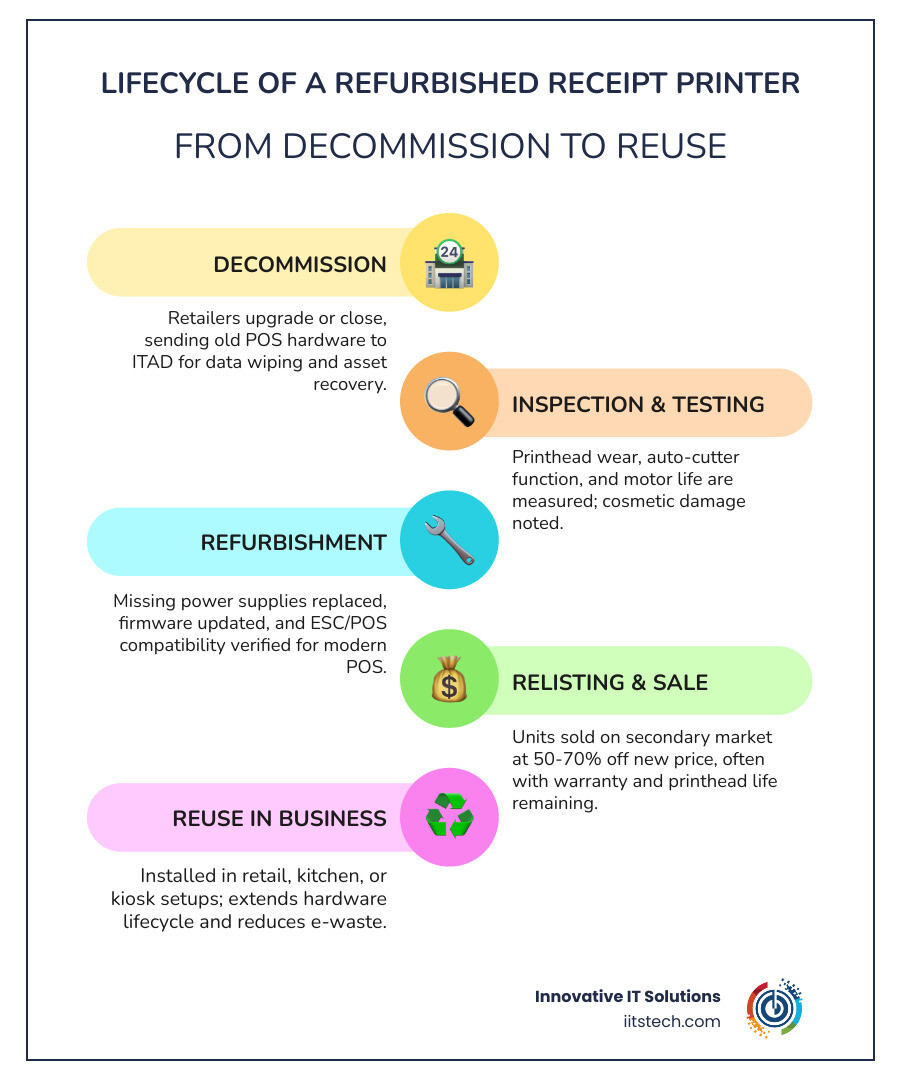
I’m Mike Haden, Founder of Innovative IT Solutions. Over 14 years in IT asset disposition, my team and I have processed and remarketed over a million pieces of enterprise IT hardware — including business-grade computers, server components, and POS peripherals like the used receipt printer — helping organizations recover value responsibly. In the sections below, I’ll walk you through everything you need to make a confident, informed purchase.
Used receipt printer glossary:
Understanding the Types of Used Receipt Printers
Before searching for a used receipt printer on the secondary market, it is essential to understand that not all printers are built for the same job. Sourcing the wrong technology can lead to smudged tickets, slow checkout lanes, or expensive ongoing consumable costs.
To help you navigate your options, we have compiled a comprehensive breakdown of the three primary receipt printer technologies below. For a broader look at how these peripherals fit into your complete checkout setup, check out our A-Z Guide to Used POS Systems.
| Printer Type | Average Print Speed | Primary Consumables | Best Business Environment |
|---|---|---|---|
| Thermal Printer | High (Up to 10–20 IPS / 250+ mm/sec) | Thermal Paper Rolls | Retail, high-volume checkout, boutique stores |
| Impact (Dot Matrix) | Medium (Up to 4–6 lines/sec) | Plain Paper Rolls & Ink Ribbons | Hot commercial kitchens, prep stations |
| Inkjet Printer | Low to Medium | Plain Paper & Ink Cartridges | Legacy banking, specialized multi-document stations |
Thermal Printers: The Gold Standard for Retail
Thermal receipt printers are the undisputed champions of modern retail. These devices utilize a specialized thermal printhead that applies heat directly to heat-sensitive paper, triggering a chemical reaction that creates text and images. Because they do not require ink, toner, or ribbon cartridges, they eliminate a massive recurring expense.
For high-volume retail checkout environments where speed is critical, performance thermal printers are the gold standard. High-end refurbished models can print at blazing speeds of up to 20 inches per second (IPS), keeping lines moving and customers happy. If you operate a standard retail counter, a boutique, or a fast-casual dining register, a refurbished thermal printer is almost always your best choice.
Impact Printers: Built for Kitchen Environments
If you try to use a thermal printer in a commercial kitchen, you will quickly run into a major problem: the heat from the ovens and fryers will turn the entire heat-sensitive receipt black, making it completely unreadable.
This is where impact (or dot-matrix) printers shine. These rugged units use physical pins that strike an ink ribbon to transfer text onto standard, non-thermal paper. Because they use physical ink, the printed text resists extreme heat, grease, and humidity without smudging or fading.
Additionally, impact printers are physically loud. While a noisy printer is a nuisance at a quiet retail counter, that distinct “clacking” sound is a valuable feature in a loud kitchen, alerting line cooks that a new order ticket has arrived. Many models also support two-color printing (typically black and red) to highlight order modifications or dietary restrictions.
What to Look For When Buying a Used Receipt Printer
Purchasing refurbished hardware is an incredibly cost-effective way to scale your checkout lanes. However, because these devices are recovered from active commercial environments, you must evaluate their condition carefully to ensure you are getting a treasure rather than trash.
Why a Used Receipt Printer with Thermal Technology is Best for Retail
When sourcing a used receipt printer for a retail application, sticking to thermal technology is highly recommended. Beyond eliminating ink costs, modern thermal printers offer advanced paper-saving functions that can reduce paper roll consumption by up to 30% by tightening margins and line spacing.
Furthermore, mid-to-high-end thermal printers, such as the refurbished Epson TM-m30II-H Model M362D Thermal Receipt Printer Bluetooth USB Hub – Owl POS, do much more than just print. They act as advanced connectivity hubs. These modern units can charge tablet-based POS systems, route network data, and connect up to four USB peripheral devices simultaneously, drastically simplifying your counter space.
Evaluating the Physical Condition of a Used Receipt Printer
When shopping the secondary market, you should look past minor cosmetic wear like light scuffs or yellowed plastic. Instead, focus on the critical internal components that dictate the hardware’s remaining lifespan:
- Printhead Life: Commercial thermal printheads are rated by the physical distance of paper they can print before degrading. High-performance models are typically rated for 150 kilometers (about 93 miles) of printing. Always ask the seller if they can print a self-test diagnostic page, which often displays the total odometer reading of the printhead.
- Auto Cutter Wear: The automatic paper cutter is the most common mechanical failure point. Professional-grade auto cutters are built to handle between 1.5 million and 2.2 million cuts. Ensure the seller has verified that the blade cuts cleanly without jamming or tearing the paper.
- Power Supplies and Cables: Many liquidators sell used receipt printers as “bare units” without power adapters or interface cables. Factor this into your budget! A high-quality replacement power supply (like the industry-standard Epson PS-180) is crucial, as cheap, third-party power adapters can deliver unstable voltage and permanently damage the printer’s circuit board.
Connectivity and POS Software Compatibility
A receipt printer is only useful if it can talk to your Point of Sale (POS) software. Before buying, you must plan your physical store layout and understand how your POS computers and network servers connect to your network. For help designing your register layout, see our guide on How to Upgrade Your Checkout Lane with Quality Refurbished POS Hardware.
Interface Options: USB, Ethernet, Wi-Fi, and Bluetooth
The interface card on the back of a used receipt printer determines how it connects to your devices:
- USB: The most reliable and fastest connection type. USB is the preferred option for fixed checkout lanes because it connects directly to business-grade POS computers, works completely offline, and is immune to wireless interference. Android devices require a special USB On-The-Go (OTG) adapter to connect via USB.
- Ethernet (LAN): Ideal for printing across a local network. If you run a tablet-based POS (like an iPad) but want a stable, wired connection, plugging your printer into your network router or local server switch via Ethernet is the best approach.
- Bluetooth: Great for mobile setups or compact counters where running cables is impossible. However, Bluetooth requires the printer to remain in close proximity to the tablet and can occasionally suffer from pairing dropouts.
- Wi-Fi: Allows wireless printing over your local network. While convenient, Wi-Fi can be prone to interference in busy environments with many connected customer devices.
- USB-Network-Tethering: A stellar feature found on modern refurbished units like the Epson TM-m30II-H. This technology allows the printer to share its wired network connection directly with a connected tablet via a standard USB cable, bypassing unstable Wi-Fi altogether.
Verifying Compatibility with Square, Shopify, and Toast
Before buying any used receipt printer, verify that it is officially supported by your POS software provider. Modern cloud-based POS platforms like Square, Shopify, and Toast are highly specific about compatible hardware.
Most industry-standard software relies on ESC/POS emulation — a standardized printer command language created by Epson. If a printer supports ESC/POS, it has a much higher chance of working across legacy and modern systems. However, tablet-based apps often require specific drivers. For example, iPads cannot communicate with standard USB printers unless the printer has specialized MFi (Made for iOS) certification or is connected via an Ethernet network.
To avoid buying incompatible gear, always cross-reference the exact model number with your POS provider’s official hardware compatibility list. For more tips on budget-friendly, compatible register components, read our guide on Used POS Terminals: A Guide to Saving Money Safely.
Top Brands and Models on the Secondary Market
Sourcing highly recognizable, industry-standard brands ensures that you will easily find replacement parts, drivers, and cheap consumables.
Epson and Star Micronics: The Industry Standards
Epson and Star Micronics dominate the commercial receipt printing market, meaning their products are highly abundant and incredibly reliable on the secondary market.
The Epson TM-T88 series (such as the TM-T88V and TM-T88VI) is widely considered the most successful thermal printer line in global retail history. These workhorses are nearly indestructible, boasting extreme printhead durability and incredibly long-lasting auto cutters.
Similarly, the Star Micronics TSP143 series (including the TSP143III) is highly sought after for its plug-and-play compatibility with modern tablet POS platforms. Star Micronics devices are integrated with over 150 industry-leading POS software partners, making them a incredibly safe bet for compatibility.
For kitchen environments, the Used Epson TM-U220B M188B Thermal Retail POS Receipt Printer – Falcon Restaurant Supply, Inc. is a legendary impact printer. Despite occasionally being mislabeled as “thermal” in some online resale listings, the TM-U220B is a rugged, dual-color dot-matrix printer built to survive the grease and extreme heat of restaurant prep lines.
Specialty and ATM Printers
For kiosk, parking garage, or ATM maintenance, standard desktop receipt printers won’t fit. These specialized applications require rugged, open-frame kiosk printers designed to be integrated directly into metal enclosures.
A prime example on the secondary market is the Wincor Nixdorf 01750063915 TP07 Thermal ATM Receipt Printer 24VDC/2.5A . These heavy-duty thermal printers operate on a standard 24VDC power supply and are recovered from working ATM setups, offering massive savings for operators looking to maintain or repair existing kiosk infrastructure.
Frequently Asked Questions About Used Receipt Printers
What are the risks of buying a used receipt printer without a power supply?
Buying a “bare” printer without its original power adapter is common on the secondary market, but it introduces two risks: hidden costs and voltage mismatch. Original manufacturer power supplies (like the Epson PS-180) can cost $30 to $50 when purchased separately, which might wipe out your initial savings. Furthermore, using cheap, third-party universal power adapters can deliver unstable voltage, causing the printer to freeze, print garbled text, or suffer permanent motherboard failure.
Why do commercial kitchens prefer impact printers over thermal models?
Commercial kitchens are hot, humid, and greasy. Thermal printer paper relies on heat-sensitive chemicals to create an image; if exposed to the ambient heat of a kitchen prep line, the entire paper roll will turn black and become unreadable. Impact printers use physical ink ribbons and mechanical pins to strike standard paper, ensuring the text remains perfectly legible regardless of the temperature. Additionally, the loud mechanical sound of an impact printer helps kitchen staff notice new orders in a noisy environment.
How long do the printhead and auto cutter last on refurbished models?
On professional-grade receipt printers (like the Epson TM-T88 or Star TSP100 series), the thermal printhead is typically rated for up to 150 kilometers of printed paper, and the automatic cutter is rated for 1.5 to 2.2 million cuts. Because standard retail receipts are only a few inches long, a professionally refurbished printer that has been cleaned and tested will easily provide many years of reliable service in a typical small-to-medium business.
Conclusion
Purchasing a used receipt printer is an exceptional way to lower your upfront IT hardware costs, reduce electronic waste, and keep highly durable equipment in the economic cycle. By matching the right technology (thermal for retail, impact for kitchens) and verifying compatibility with your business-grade POS computers and server infrastructure, you can secure enterprise-grade hardware for a fraction of retail prices.
At Innovative IT Solutions, we specialize in comprehensive IT asset disposition (ITAD), certified electronics recycling, and secure asset recovery. Proudly operating out of Oklahoma City, Oklahoma, we help organizations across the United States maximize returns on their retired hardware through EPA-compliant, zero-landfill processes.
Whether you are looking to source high-quality refurbished peripherals or responsibly retire your business’s legacy IT assets, we are here to help.
Ready to upgrade your checkout lane? Upgrade your checkout lane with the Ingenico Lane 8000 POS terminal today, or contact our team to learn more about our certified hardware recovery and resale solutions!


