
Why “DoD Compliant Data Destruction” Is More Complicated Than You Think
DoD compliant data destruction is not a single method — it is a moving target that has changed significantly since its origins in the 1990s. Here is what you actually need to know:
| Question | Quick Answer |
|---|---|
| What is the current DoD standard? | NIST SP 800-88 Rev. 2 (2025) — not the old DoD 5220.22-M |
| Is multi-pass overwriting enough? | No — especially not for SSDs, NVMe, or any flash storage |
| Does “military-grade wiping” mean DoD-approved? | No — it is largely a marketing term with no official backing |
| What methods are accepted? | Clear, Purge, or Destroy — depending on media type and data sensitivity |
| Do I need documentation? | Yes — a Certificate of Destruction is required for most regulated industries |
Many IT managers are still operating under the assumption that running a 3-pass or 7-pass overwrite covers their compliance obligations. It does not — and it has not for nearly two decades.
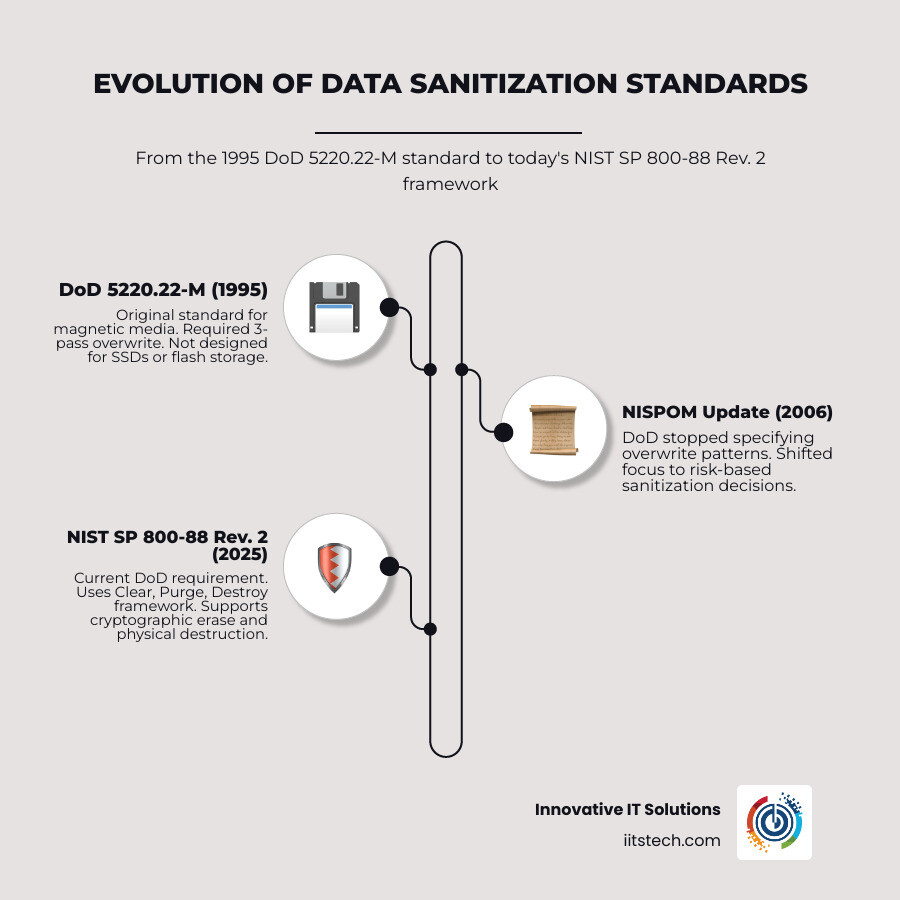
The DoD 5220.22-M standard was written in 1995, before SSDs existed in the enterprise. The DoD’s own NISPOM policy stopped specifying overwrite patterns as far back as 2006. Today, DoD contractors are required to follow NIST SP 800-88 — a framework that accounts for modern storage architectures, flash memory, and cryptographic erasure methods that simply did not exist when the old standard was drafted.
The stakes are real. Choosing the wrong sanitization method — or trusting a vendor’s “military-grade” marketing claim — can expose your organization to data breaches, failed compliance audits, and serious legal liability under HIPAA, PCI-DSS, and CMMC.
This guide cuts through the confusion and gives you a clear, practical picture of what compliant data destruction actually looks like in 2026.
I’m Mike Haden, Founder and Director of Business Development at Innovative IT Solutions. Over 14 years of running an R2v3-certified IT Asset Disposition (ITAD) operation — processing over a million pieces of enterprise hardware — I have helped organizations navigate DoD compliant data destruction requirements while recovering value from retired assets responsibly. In the sections ahead, I’ll share exactly what we’ve learned so you can make informed, defensible decisions for your organization.
Dod compliant data destruction word guide:
- broken business IT hardware for cash
- enterprise electronic recycling programs
- business electronics recycling
The Myth of “Military-Grade” DoD Compliant Data Destruction
If you have spent any time researching hard drive sanitization, you have undoubtedly run into the term “military-grade.” Software vendors love to plaster this phrase across their marketing materials, usually promising that their tool uses the “DoD 5220.22-M standard” to perform a 3-pass or 7-pass wipe.
But here is the industry secret: the Department of Defense (DoD) does not certify commercial software, nor does it currently recommend the DoD 5220.22-M standard for enterprise data sanitization.
The DoD 5220.22-M standard originated in the 1995 National Industrial Security Program Operating Manual (NISPOM). It was designed during an era when magnetic tapes and low-density spinning hard drives ruled the data center. The standard specified overwriting a sector with a fixed character, then its complement, and finally a random character, followed by verification.
While this was highly effective for the magnetic platters of the 1990s, the physical landscape of enterprise storage has changed entirely. The federal government recognized this, which is why the three-pass sanitization provision in the 1995 edition of NISPOM was officially removed in a 2001 memorandum. In fact, the three-pass method was never actually permitted for Top Secret media. By 2006, the DoD NISPOM policy stopped specifying any overwriting patterns for erasing hard drives.
Today, the Department of Defense and its contractors are required to align their data sanitization policies with modern frameworks. Specifically, they utilize the Guidelines for Media Sanitization (NIST SP 800-88), which provides a much more robust, technology-agnostic approach to securing data at the end of its lifecycle.
Why the DoD 5220.22-M Standard is Outdated for Modern Enterprise IT
Using the legacy DoD 5220.22-M standard for modern enterprise hardware is not just unnecessary—it can actively damage your equipment and waste valuable resources.
First, consider the physical mechanics. Modern hard disk drives (HDDs) have incredibly high track densities compared to the drives of 1995. Because of these technological advances, a single overwrite pass is now more than enough to make data recovery impossible, even under laboratory-level magnetic force microscopy. Writing data three or seven times does not make the data “more erased”; it simply adds massive multi-pass overhead, slowing down your decommissioning pipeline and consuming excess energy.
Second, when applied to solid-state drives (SSDs), multi-pass overwriting is one of the most Ineffective Data Destruction Methods you can choose. SSDs do not store data on sequential magnetic tracks. Instead, they write data across flash memory cells managed by a complex controller. Forcing a legacy multi-pass overwrite on an SSD does not guarantee that all data blocks are reached, but it does cause severe write wear, prematurely degrading the drive’s lifespan and destroying its residual value.
The Pitfalls of “DoD Compliant” Marketing Claims
When a software vendor claims their tool is “DoD Compliant,” they are usually capitalizing on a legacy buzzword. Because there is no official “DoD certification” for commercial data wiping software, these claims are entirely self-declared.
For enterprise IT asset managers, relying on these claims during compliance audits is a major risk. If your organization is subject to strict regulatory oversight, simply showing an auditor a log sheet that says “Wiped to DoD 5220.22-M” can result in a failed audit. Auditors look for compliance with active, recognized standards like NIST SP 800-88 Rev. 2 or IEEE 2883. If your vendor is still relying on 1995 guidelines, it is a clear sign that their processes have not kept pace with modern storage technology.
Modern Standards: NIST SP 800-88 Rev. 2 vs. IEEE 2883
In professional data destruction, two modern standards have taken center stage: NIST SP 800-88 Rev. 2 and IEEE 2883.
NIST SP 800-88 was originally issued in 2006 and received a major revision (Rev. 1) in 2014. In September 2025, the NIST Editorial Review Board approved NIST SP 800-88 Rev. 2, officially superseding the decade-old Rev. 1 guidelines. This updated standard provides a highly structured, risk-based framework for media sanitization, emphasizing that the method chosen must match the specific media type and the confidentiality level of the data.
Shortly before the latest NIST update, the Institute of Electrical and Electronics Engineers published IEEE 2883 in August 2022. While NIST SP 800-88 is a policy-oriented guideline widely adopted by U.S. federal agencies and commercial enterprises, IEEE 2883 is a highly technical, global standard that defines exact security commands and mathematical verification methods for modern storage technologies, including NVMe, SATA, and SAS drives.
Together, these standards move away from arbitrary “pass counts” and focus on leveraging the drive’s own hardware capabilities to ensure complete data sanitization.
| Sanitization Category | Definition | Typical Method | Best Suited For |
|---|---|---|---|
| Clear | Overwriting user-addressable storage locations using logical interface commands. | Standard logical overwrite (1-pass) or factory reset commands. | Non-sensitive data, internal redeployment. |
| Purge | Protecting data against advanced laboratory-level recovery techniques. | ATA/NVMe Secure Erase, Cryptographic Erase (CE), or Degaussing (magnetic only). | Highly sensitive data, external resale, or transfer of ownership. |
| Destroy | Physically destroying the media to make data recovery impossible. | Shredding, disintegration, incineration, or pulverizing. | End-of-life hardware, physical drive failures, or maximum security requirements. |
Clear, Purge, and Destroy: The NIST Sanitization Framework
To build a compliant media disposal process, defense contractors and enterprise businesses often Implement a 7-Step Checklist for Destroying or Sanitizing Media with FCI. This checklist relies directly on the three categories of sanitization defined by NIST:
- Clear: This involves basic logical techniques. It typically overwrites user-addressable sectors with a character pattern. Clearing is suitable if the storage media will remain within your organization’s security boundary and be reused by employees with similar access privileges.
- Purge: Purging uses more aggressive logical or physical commands to target all storage sectors, including those not normally accessible via standard operating system commands (such as overprovisioned blocks or wear-leveled sectors on SSDs). This is achieved through firmware-level commands like ATA Secure Erase or Cryptographic Erase. Purging is required if the media is leaving your control (e.g., being sold, returned to a lessor, or donated).
- Destroy: When a drive is physically broken, cannot accept firmware commands, or contains highly classified data that cannot leave the facility intact, physical destruction is the only acceptable path. This includes industrial shredding, crushing, or high-temperature incineration.
Sanitizing Modern Storage: HDDs, SSDs, and NVMe Drives
Understanding the physical differences between magnetic and solid-state storage is critical when executing a DoD compliant data destruction strategy. If you treat an SSD like an old spinning hard drive, you are leaving your business open to massive data leaks.
Why Traditional Wiping Fails on Solid-State Drives
To understand why traditional software wiping fails on solid-state drives, we have to look at how they manage data. A traditional HDD writes data sequentially to physical sectors on spinning magnetic platters. When you tell a software tool to overwrite sector 100, it goes directly to sector 100 and changes the magnetic charge.
SSDs do not work this way. They use flash memory cells, which can only handle a limited number of write cycles before wearing out. To extend the life of the drive, the SSD’s internal controller uses a Flash Translation Layer (FTL) and wear-leveling algorithms.
When you attempt to overwrite a specific file or sector on an SSD, the FTL intercepts the command and writes the new data to a completely different, less-worn physical block. The old block is marked for deletion but remains intact in the drive’s overprovisioned or reserved space until a garbage collection routine runs.
Furthermore, traditional software utilities like Darik’s Boot and Nuke (DBAN) are designed specifically for HDDs. DBAN does not detect or securely erase SSDs—a limitation explicitly stated on their own home page. If you run DBAN on an SSD, you are only writing to the user-addressable space that the FTL exposes, leaving a significant amount of residual data intact in hidden or reallocated blocks. For a deeper look at this process, read our detailed guide on Wiping An Ssd Drive How Is It handled in professional settings.
Executing DoD Compliant Data Destruction on NVMe and SSDs
To achieve compliant sanitization on modern solid-state and NVMe drives, we must use firmware-level commands rather than operating system-level overwrites.
- ATA / NVMe Secure Erase: This process utilizes built-in hardware commands. When executed, the drive controller sends a high-voltage electrical charge to all flash memory blocks simultaneously, erasing all data—including overprovisioned and retired blocks—in a matter of seconds.
- Cryptographic Erasure (CE): If Full Disk Encryption (FDE) was enabled on the drive from day one, Cryptographic Erasure is a highly effective purge method. By securely destroying the physical decryption keys stored on the drive controller, the remaining data on the flash chips instantly becomes unrecoverable, scrambled ciphertext.
- Physical Disintegration: If a drive is physically dead and cannot accept commands, or if you are dealing with classified government data, physical destruction is required. However, standard hard drive shredders designed for HDDs are not sufficient for SSDs. Because SSD memory chips are incredibly small, the drive must be processed by a specialized shredder capable of reducing the debris to particles of 2mm or smaller to ensure no intact memory fragments remain.
Comparing Software Wiping, Degaussing, and Physical Destruction
No single data destruction method is perfect for every scenario. When managing a fleet of decommissioned enterprise computers or server components, we must weigh the benefits of software wiping, degaussing, and physical destruction.
Software-Based Wiping: Bulk Erasure and Drive Reuse
If your organization wants to balance security with environmental sustainability and cost recovery, software-based wiping is the ideal choice. By utilizing certified software-based sanitization, you can securely erase drives, verify the results, and safely reuse or resell the hardware.
For bulk operations, open-source command-line tools like nwipe or standard Linux tools can work for basic internal clearing. However, for true compliance, commercial solutions like Blancco or LSoft Active@ KillDisk are preferred. These tools execute hardware-level commands, verify that every sector was successfully overwritten, and automatically generate auditable reports.
Before beginning this process in-house, it is crucial to follow a structured approach. You can review our step-by-step checklist on How To Prepare It Equipment For Secure Disposal A Step By Step Guide to ensure your team doesn’t miss critical security steps.
Degaussing: Magnetic Media Demagnetization
Degaussing is the process of exposing magnetic media to an incredibly powerful magnetic field. This field completely disrupts the magnetic domains on the platters of an HDD or the tape of a backup cartridge, rendering the stored data completely unrecoverable.
Degaussing is incredibly fast and highly secure for older magnetic storage. However, it has two major limitations:
- It renders the drive useless: Degaussing destroys the factory-written servo tracks on HDDs, meaning the drive can never be formatted, reused, or resold.
- It is completely ineffective on SSDs: Because solid-state drives store data electrically rather than magnetically, placing an SSD in a degausser does absolutely nothing to the data.
If you are considering this method for your legacy magnetic media, you can Learn More About Degaussing Other Data Deleting Options to see how it fits into a broader enterprise sanitization policy.
Physical Destruction: When Shredding is the Only Option
When drives are physically damaged, cannot be recognized by sanitization software, or contain high-consequence data that must be destroyed under strict regulatory mandates, physical shredding is the only acceptable path.
Physical shredding involves passing the drives through heavy-duty industrial shredders that bend, crush, and chop the media into tiny fragments. Under (U) NSA/CSS Policy Manual 9-12, “Storage Device Sanitization and Destruction Manual”, devices used for physical destruction must meet incredibly strict performance thresholds:
- Platter Deformation: HDD destruction devices must physically deform the platters by bending, punching, or waffling them in 30 seconds or less to prevent any physical data extraction.
- Continuous Operation: High-security destruction devices must be capable of operating continuously for at least one hour, destroying a minimum of 100 hard drives during that window with no more than 3 jams.
- Particle Size: For solid-state media, the shredder must reduce the flash memory chips to a nominal particle size of 2mm or smaller.
For Oklahoma businesses, choosing a partner with industrial-grade, certified shredding equipment is essential. To understand why so many local enterprises choose this method, explore the Unfolding Reasons For Hard Drive Shredding in modern cybersecurity strategies.
Compliance, Auditing, and Legal Implications
For modern enterprises, secure data destruction is no longer just an IT concern—it is a legal mandate. Failing to properly sanitize retired IT assets can result in catastrophic data breaches, multi-million dollar regulatory fines, and permanent brand damage.
Partnering with a certified ITAD provider is the most effective way to protect your business. You can learn more about these benefits in our guide on Why Should Your Business Use Certified Data Destruction Services For Compliance.
Legal and Regulatory Frameworks (HIPAA, PCI-DSS, CMMC)
Depending on your industry, your media disposal practices are governed by specific federal and international regulations:
- HIPAA (Healthcare): Under the HIPAA Security Rule, healthcare providers and their business associates must implement strict policies for the disposal of electronic protected health info (ePHI). To learn how to navigate these strict requirements, check out our resource on Hipaa And Itad What Healthcare Providers Must Know.
- PCI-DSS (Retail & Finance): The Payment Card Industry Data Security Standard requires the complete physical destruction or secure sanitization of any storage media that has held cardholder data, ensuring it cannot be reconstructed.
- CMMC (Defense Industrial Base): If your business handles Federal Contract Information (FCI) or Controlled Unclassified Information (CUI), you must comply with CMMC 2.0 Level 1 and Level 2 requirements. This includes establishing a strict, auditable media sanitization process that aligns with NIST SP 800-88 guidelines.
Generating Auditable Certificates of Destruction
If an auditor walks into your office today, simply telling them that you shredded your old server drives is not enough. You must prove it.
A compliant data destruction process requires a complete, unbroken chain of custody and detailed documentation. When we destroy or sanitize assets at Innovative IT Solutions, we generate a formal Certificate of Destruction (CoD).
This document serves as your legal proof of compliance. It includes:
- The exact date, time, and location of the sanitization or destruction.
- A detailed inventory of the media, including serial numbers, asset tags, and drive models.
- The specific sanitization standard used (e.g., NIST SP 800-88 Purge via ATA Secure Erase).
- The names and signatures of the technicians who performed and verified the process.
To understand how to read and manage these critical documents, read our article Demystifying The Certificate Of Destruction For Your Business.
Frequently Asked Questions About Media Sanitization
What is the difference between NIST 800-88 and DoD compliant data destruction?
The legacy DoD standard (DoD 5220.22-M) is an outdated, 1995-era specification that requires multiple overwrite passes designed specifically for older magnetic platters. NIST SP 800-88 Rev. 2 is the modern, risk-based federal standard that supports advanced sanitization methods (Clear, Purge, and Destroy) tailored to modern storage media, including flash memory and NVMe drives.
Why is traditional overwriting software not recommended for SSD data destruction?
Traditional software-based overwriting tools like DBAN write data sequentially to user-addressable sectors. Because SSDs utilize wear-leveling algorithms and overprovisioned blocks managed by an internal Flash Translation Layer (FTL), traditional software cannot access or overwrite hidden or retired blocks, leaving residual data intact.
When does the NSA require physical destruction over software wiping?
The NSA requires physical destruction (or a combination of degaussing and platter deformation) for any storage media that has held classified or Top Secret/Sensitive Compartmented Information (TS/SCI). Under the Classified Material Destruction Checklist, standard software overwriting (clearing) is strictly insufficient for decommissioning or disposing of classified equipment outside of its original secure environment.
Conclusion
Navigating the complexities of DoD compliant data destruction doesn’t have to be a headache for your IT team. By moving away from outdated “military-grade” myths and aligning your business with active NIST SP 800-88 guidelines, you can protect your company from data breaches while ensuring full regulatory compliance.
At Innovative IT Solutions, we provide enterprise-grade, certified IT Asset Disposition (ITAD) and data destruction services right here in Oklahoma City. Whether you need on-site physical hard drive shredding, bulk NIST-compliant software sanitization for server components, or certified business electronics recycling, we provide a secure, EPA-compliant, and zero-landfill process backed by full documentation and auditable Certificates of Destruction.
Ready to secure your retired IT assets and protect your business? Contact us today to discuss your data sanitization needs, or learn more about our certified Innovative IT Solutions Business Electronics Recycling Services.


