
Don’t Smash Your Hard Drive: How to Safely Recycle Old Computers
The Hidden Risks of Getting Rid of Old Business Computers
Knowing how to get rid of old computers safely is one of the most overlooked compliance risks in enterprise IT — and one of the most consequential. A 2024 study found that 40% of second-hand hard drives purchased on the open market still contained recoverable data. That’s not a fringe problem. That’s a data breach waiting to happen.
Here’s the short answer for IT managers:
- Back up all data to approved storage before touching anything
- Sign out of all accounts and deauthorize software licenses
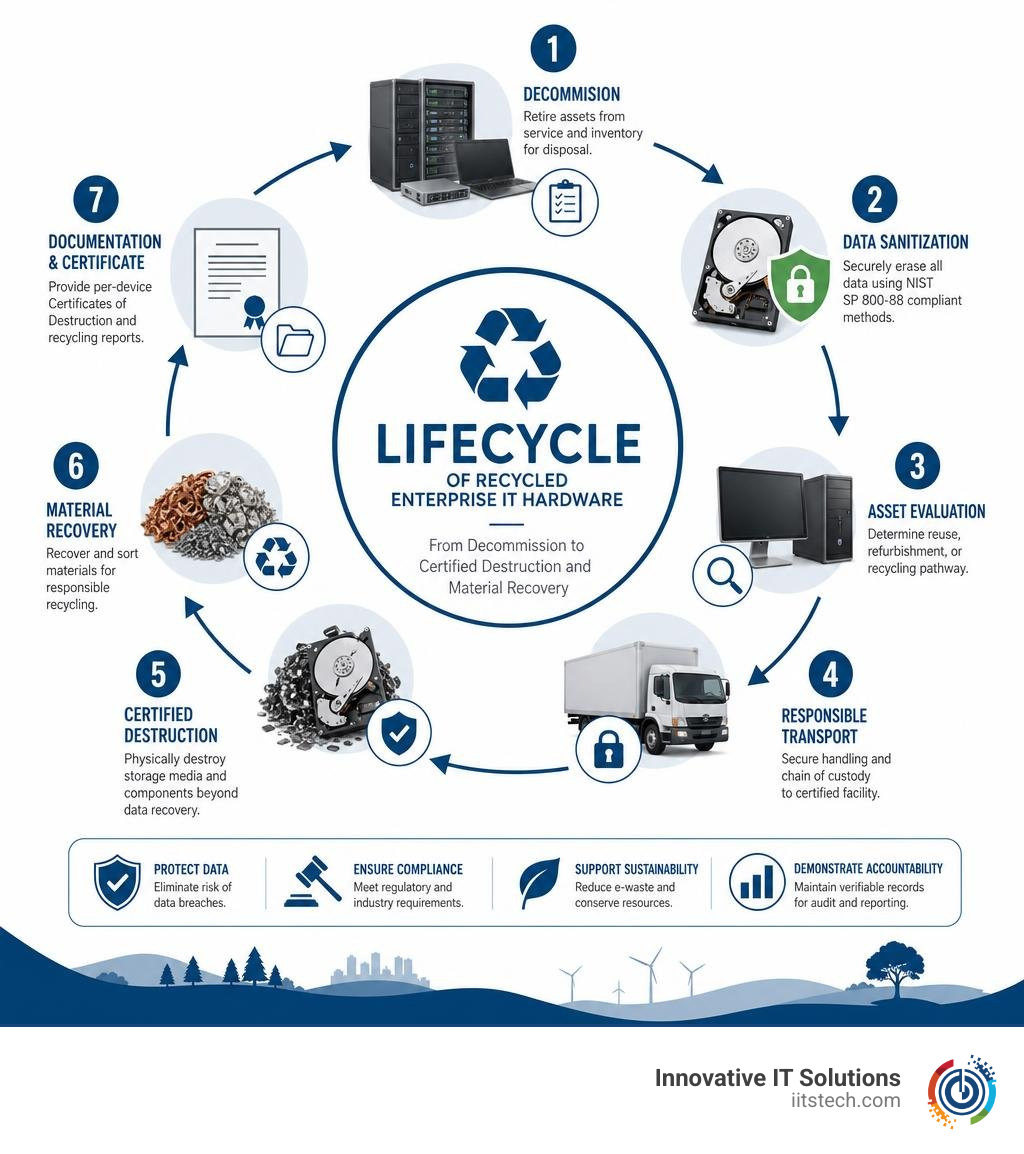
- Wipe drives using NIST SP 800-88 compliant methods — not just factory reset
- Choose a certified recycler with R2v3 or e-Stewards certification
- Request per-device Certificates of Destruction with serial numbers
- Retain documentation for 7 years minimum (longer for HIPAA-regulated data)
The stakes are real. A Boston-area medical practice faced $1.2 million in combined penalties after a hard drive with recoverable patient data turned up on eBay — sold through an uncertified vendor. A Massachusetts healthcare organization was hit with $340,000 in OCR fines because their recycler issued only a batch certificate that couldn’t identify which specific devices were destroyed.
These aren’t edge cases. They’re the predictable result of treating old hardware as a low-priority problem.
Most organizations don’t have a disposal problem — they have a documentation and verification problem. The hardware leaves the building. The proof of what happened to it doesn’t follow.
This guide walks you through every step: secure data destruction by OS and device type, how to evaluate disposal paths based on your hardware’s condition and quantity, what certifications actually mean, and what Massachusetts-specific regulations apply to your business.
I’m Mike Haden, Founder and Director of Business Development at Innovative IT Solutions, Inc., where I’ve spent 14 years building an R2v3-certified ITAD operation that has processed over a million pieces of enterprise IT equipment with a strict focus on secure, compliant disposal — including helping clients navigate exactly how to get rid of old computers safely under real regulatory pressure. Everything in this guide reflects what I’ve seen work (and fail) in the field.
Why You Can’t Just Trash Business IT Assets

When we talk about retiring old business computers, server chassis, and networking switches, throwing them into the dumpster behind your office in Oklahoma City or South OKC is out of the question. Apart from the massive security risks, there are heavy environmental and legal rules that govern the disposal of commercial IT hardware.
Computer components are packed with hazardous substances like lead, mercury, cadmium, arsenic, and brominated flame retardants. If left to rot in a standard landfill, these toxic materials can slowly leach into soil and local water systems.
Furthermore, modern enterprise devices rely heavily on lithium-ion batteries for portable workstations and internal backup power supplies. These batteries are highly volatile. When compacted inside standard garbage trucks or landfill rollers, they can easily rupture, ignite, and cause catastrophic fires.
Because of these dangers, 25 U.S. states plus the District of Columbia have passed strict laws regulating electronics disposal. While we operate out of our secure ITAD facility in Oklahoma City, many of our corporate clients manage multi-state operations. They must comply with highly restrictive regional rules, such as the Massachusetts solid waste ban on electronics. Under these strict rules, disposing of monitors and computers in regular trash is completely illegal.
If your organization is caught violating these waste bans, you could face massive environmental fines. To learn more about avoiding these pitfalls, see our guide on properly disposing of IT equipment. For a broader perspective on why these materials must be kept out of municipal landfills, you can read Lenovo’s guide on computer recycling.
The Illusion of Deletion: Why Factory Resets Fail

Many IT administrators mistakenly believe that running a quick factory reset or formatting a drive is enough to protect corporate data. In reality, these basic methods are incredibly easy to bypass.
When you delete a file or perform a standard operating system format, the drive does not physically erase the data. Instead, it simply removes the directory reference (the file system index) and marks that storage space as “available” for future writing. The actual files remain completely intact on the magnetic platters or flash memory blocks until they are eventually overwritten by new data.
With solid-state drives (SSDs), the problem is even more complex. SSD controllers use “wear leveling” algorithms to distribute write operations evenly across the drive’s physical chips. This means that standard overwriting tools often miss older, hidden blocks of data entirely, leaving highly sensitive corporate files fully intact.
This is why simple deletion is a major security risk. Forensic tools can easily recover files from these drives. As noted in the ABC News report on data risks in e-waste, relying on standard operating system resets is highly risky because they do not guarantee physical erasure.
Relying on these ineffective data destruction methods is a massive gamble for any business. To protect your company from data leaks, you must use certified, professional data sanitization techniques.
How to Get Rid of Old Computers Safely: Step-by-Step Data Destruction
To guarantee that your company’s proprietary data is permanently unrecoverable, we must follow the strict standards set by the National Institute of Standards and Technology (specifically the NIST SP 800-88 guidelines for media sanitization).
Before you send any corporate hardware for recycling or resale, you must systematically prepare it. Start by reviewing our checklist on preparing IT equipment for secure disposal.
Here is how to handle the data destruction process across different enterprise platforms:
How to Get Rid of Old Computers Safely on Windows Enterprise Systems
For Windows-based workstations, laptops, and local servers, you should follow a multi-step sanitization process:
- Deauthorize Software and Accounts: Sign out of all enterprise accounts, cloud storage tools, and software licenses (such as Microsoft 365 and Adobe Creative Cloud).
- Enable BitLocker Drive Encryption: If the drive is already encrypted, changing or destroying the encryption keys (cryptographic erasure) makes the underlying data instantly unrecoverable.
- Execute Windows Reset with Data Cleaning: Go to Settings > Update & Security > Recovery > Reset this PC. Choose Remove everything, then select Change settings and toggle the Clean data option to “Yes”. This performs a full overwrite of the storage drive rather than a quick format.
If you are dealing with modern flash storage, you can find more advanced tips in our article on wiping an SSD drive.
How to Get Rid of Old Computers Safely on Mac and Apple Silicon
Modern macOS devices make data destruction much simpler thanks to hardware-level encryption:
- Sign Out of iCloud: Open System Settings, click your Apple ID, and sign out of all iCloud services, Find My Mac, and iMessage.
- Utilize Erase All Content and Settings: For Macs with Apple Silicon or those equipped with the Apple T2 Security Chip, go to System Settings > General > Transfer or Reset > Erase All Content and Settings.
- Cryptographic Erasure: Because these modern Macs encrypt their storage drives by default, this reset instantly destroys the cryptographic keys. Without those keys, the data left on the physical chips is rendered completely unrecoverable.
Handling Non-Powering Servers and Hard Drives
If a workstation, server, or external array refuses to power on, software-based wiping is no longer an option. In these cases, you must use physical destruction methods:
- Degaussing: For traditional magnetic hard drives (HDDs), passing the drive through a high-intensity magnetic field (degaussing) completely disrupts the magnetic domains, destroying both the data and the drive’s firmware. Degaussing does not work on SSDs.
- Physical Shredding: For both HDDs and SSDs, physical shredding is the gold standard. Heavy-duty industrial shredders crush, bend, and chop the storage platters or flash memory chips into tiny, unreadable fragments.
To determine which method is best for your retired hardware, read our analysis on physical destruction vs data wiping.
Choosing the Right Disposal Path: Donation, Recycling, or Professional ITAD
Once your data is securely destroyed, you need to choose the best disposal path for your physical hardware. The right choice depends on the age, condition, and quantity of your equipment.
For a detailed look at how to get value back from your old hardware, read about the business benefits of IT recycling. You can also check out TechGolly’s guide on protecting your data during disposal to learn more about balancing security with environmental responsibility.
When to Donate vs. Recycle Working Corporate Hardware
If your business is retiring functional systems that are less than five to seven years old, donation is a great option. Giving these systems to local non-profits, schools, or refurbishment programs helps bridge the digital divide.
However, before donating any hardware, ask yourself these key questions:
- Does the system power on and function properly? Non-profits do not have the budget or staff to repair broken hardware.
- Does it meet modern performance standards? Slow, outdated systems can be more of a burden than a help.
- Is all corporate data completely wiped? You must never donate a device with data still on it.
If your equipment is too old, damaged, or obsolete, it should go directly to a certified recycler for material recovery. To help you decide, read our guide on deciding whether to recycle or resell IT equipment.
Verifying Certified Recyclers and Requesting Certificates of Destruction
Never hand over your business computers to an uncertified recycler. Uncertified operations often export electronic waste to developing countries or dump it in local landfills. Worse, they may resell your drives without destroying your data.
To protect your business, only work with ITAD providers that hold these leading industry certifications:
- R2v3 (Responsible Recycling): The global standard for electronics recycling, focusing on environmental safety, worker health, and strict data security.
- e-Stewards: A rigorous certification program that bans the export of hazardous e-waste to developing nations.
After processing your hardware, a certified ITAD partner must provide you with a formalized Certificate of Destruction. This document is your proof of compliance for audits, showing exactly when and how each device was destroyed. For more details on this process, see our guide on ensuring certified data destruction.
Frequently Asked Questions about Computer Disposal
To help you choose the best disposal path for your business, here is a quick comparison of DIY wiping versus professional ITAD services:
| Feature / Consideration | DIY In-House Wiping | Professional ITAD Services |
|---|---|---|
| Data Security Level | Variable (depends on staff expertise) | High (NIST 800-88 compliant) |
| Verification & Audit Trail | Manual spreadsheets (prone to errors) | Serialized Certificates of Destruction |
| Scalability | Hard to scale for large batches | Highly scalable (handles hundreds of assets) |
| Environmental Compliance | Hard to track downstream | Zero-landfill guarantee |
| Labor Costs | High (takes up valuable internal IT time) | Low (outsourced to specialists) |
Is it illegal for businesses to throw away old computers in Massachusetts?
Yes. Under the Massachusetts Department of Environmental Protection (MassDEP) solid waste bans, it is illegal for businesses to throw away computers, monitors, and other electronic devices in regular trash.
Even if your business is based in Oklahoma City or South OKC, you must follow strict environmental rules. If you manage offices or clients in Massachusetts, you must comply with these laws. Handing your assets to a certified recycler is the best way to ensure compliance. You can learn more about local options in our article on How to Properly Dispose of Electronics: Computer Recycling in Oklahoma City. Organizations can also look at the Oklahoma City recycling options for additional local guidance.
What is the difference between a batch certificate and a per-device Certificate of Destruction?
A batch certificate simply states that a box or pallet of mixed electronics was received and processed on a specific date. It does not list individual serial numbers, making it legally insufficient for strict compliance audits.
A per-device Certificate of Destruction lists the exact serial number, make, and model of every single hard drive, SSD, or server blade destroyed. This serialized audit trail is crucial for meeting regulatory standards like HIPAA, PCI-DSS, or SOX. To see why this matters, read our guide on why businesses need certified data destruction for compliance.
Do we need to physically destroy SSDs and server hard drives?
While software wiping works well for functional SSDs, physical destruction is required for non-working drives or highly regulated data.
SSDs cannot be destroyed using standard magnetic degaussers. They must be physically shredded or disintegrated to ensure the flash memory chips are completely destroyed. For more details, read about the importance of hard drive shredding.
Conclusion
Knowing how to get rid of old computers safely is about much more than just cleaning out your storage closet. It is a critical business process that protects your company from data breaches, environmental fines, and compliance penalties.
At Innovative IT Solutions, we provide certified, secure IT asset disposition (ITAD) services for businesses across Oklahoma City, OKC, South OKC, and the wider Oklahoma region. Our NIST-compliant, zero-landfill processes ensure that your data is permanently destroyed and your old hardware is recycled in full compliance with all environmental laws.
Let our team handle the logistics, data security, and compliance documentation for you. To get started, visit our main guide on how to dispose of electronic waste or contact us today to schedule a secure pickup.


