
Why Properly Disposing of IT Equipment Matters More Than You Think
When it’s time to dispose of IT equipment, the stakes are higher than most people realize — for your data, your organization, and the environment.
Here’s a quick answer to get you started:
How to dispose of IT equipment responsibly:
- Wipe all data from storage devices before releasing any hardware
- Remove batteries and prepare equipment for transport
- Choose a certified ITAD provider for secure, compliant disposal
- Explore donation or resale for equipment that still has value
- Use retailer take-back programs (like Best Buy) for consumer-grade electronics
- Never put electronics in the trash or curbside recycling — it’s illegal in many states
Old computers, servers, and mobile devices don’t just become useless when they’re decommissioned. They carry sensitive data, toxic materials, and real recoverable value. Electronics contain hazardous substances like lead, mercury, beryllium, and cadmium. If these end up in a landfill, those contaminants can leach into soil and water. Many states have made improper disposal illegal — Illinois, for example, bans throwing specific electronics in the trash outright.
For IT managers at mid-sized organizations, the challenge goes beyond environmental responsibility. Decommissioning hardware without a clear process creates serious risks: data breaches, compliance violations, and lost asset value.
I’m Mike Haden, Founder and Director of Business Development at Innovative IT Solutions, where I’ve spent 14 years helping organizations dispose of IT equipment securely and responsibly through our R2v3-certified ITAD programs. In that time, we’ve processed over a million pieces of enterprise hardware — and I’ve seen what happens when businesses skip the proper steps.
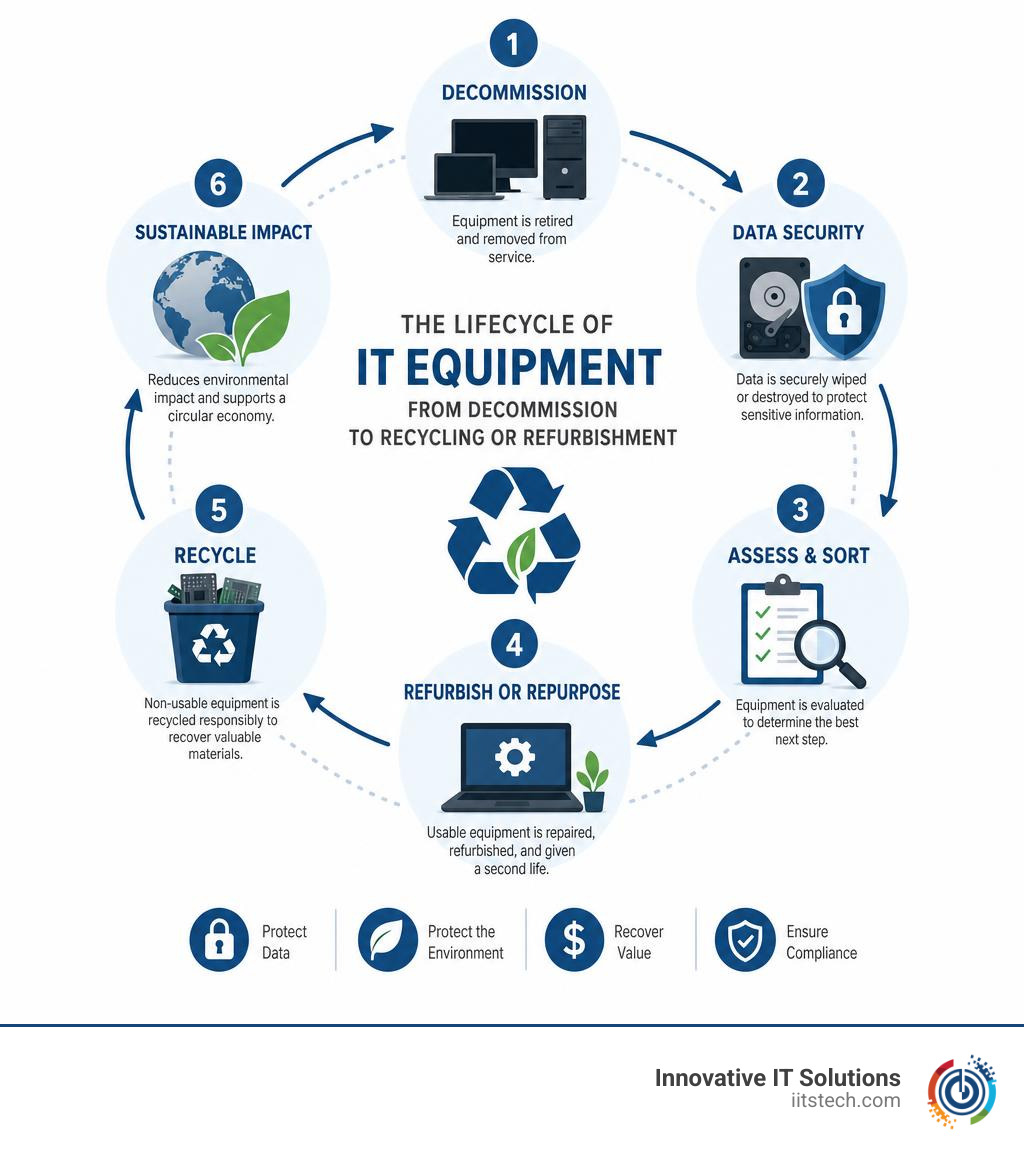
Why You Cannot Simply Throw Away E-Waste
It is incredibly tempting to take that stack of old office laptops, throw them into a giant cardboard box, and drag them down to the dumpster behind your building. However, doing so is a recipe for ecological and legal disaster.
Electronic waste (or e-waste) is not like standard municipal waste. Consumer and enterprise electronics are packed with heavy metals and toxic chemicals. When these devices sit in a landfill, they are exposed to the elements. Over time, rainwater causes these toxic materials to leach out of the plastics and glass, seeping directly into local soil and municipal water tables.
The primary culprits of environmental contamination in IT hardware include:
- Lead: Found in older cathode-ray tube (CRT) monitors and solder on printed circuit boards. Lead causes severe damage to the human nervous and reproductive systems.
- Mercury: Frequently used in the backlighting of older flat-panel LCD monitors and laptops. Even tiny amounts of mercury can contaminate millions of gallons of water.
- Cadmium: Present in chip resistors, infrared detectors, and older semiconductor chips. It is a known carcinogen that targets kidney and bone health.
- Beryllium: Commonly found in motherboards and connectors. Inhaling beryllium dust during improper processing can lead to chronic, incurable lung diseases.
Because of these severe environmental and public health risks, landfill bans have become the standard across the country. Throwing a specific set of electronic devices into the trash is illegal in states like Illinois under the Consumer Electronics Recycling Act. In other states, local municipalities enforce strict bans on curbside disposal of electronics.
If you are wondering how your business can navigate these rules without getting hit by hefty fines, check out our comprehensive guide on How to Dispose of Electronic Waste.
Best Practices to Dispose of IT Equipment Responsibly
To handle electronics recycling properly, it helps to understand what the industry refers to as WEEE (Waste Electrical and Electronic Equipment). Broadly speaking, if an item has a plug, uses batteries, requires charging, or features a picture of a crossed-out wheelie bin, it is classified as WEEE. These items must be diverted from standard municipal waste streams.

Many regions enforce “extended producer responsibility” laws. For example, Virginia law requires any manufacturer that sells more than 500 units of computer equipment in the state to provide an opportunity for customers to return or recycle their equipment at no charge. While Oklahoma does not have the exact same manufacturer mandates, our local communities have established robust recycling frameworks to keep these items out of our local landfills.
For residents in the Oklahoma City metro area, the City of OKC provides specialized drop-off options and guidelines through their Reuse and Repurpose portal to help consumers find certified local drop-off hubs.
However, if you are managing a business, residential drop-off sites are not designed to handle your volume, nor do they offer the data security documentation your organization legally requires. For commercial entities, utilizing professional E-Waste Recycling Services: The Smart Way to Dispose of Electronics is the only way to guarantee both environmental compliance and data protection.
Why Businesses Must Safely Dispose of IT Equipment
For an enterprise, the environmental aspect of e-waste is only half the battle. The far more terrifying risk is data security. When you dispose of IT equipment, every hard drive, solid-state drive (SSD), copier memory board, and mobile phone represents a potential data breach waiting to happen.
Simply dragging files to the recycle bin or performing a basic factory reset does not erase the data; it merely hides the pointers to those files. A teenager with basic data-recovery software downloaded off the internet can easily reconstruct your sensitive financial records, employee social security numbers, or proprietary client data.
To protect your business, you must adhere to strict data sanitization standards, such as NIST SP 800-88 r1 (Guidelines for Media Sanitization). This standard requires verified overwriting, degaussing, or physical destruction of the media.
Furthermore, businesses must comply with federal and state regulations like HIPAA, FACTA, and GLBA. Failing to provide a documented chain of custody and a certified audit trail can result in devastating financial penalties. Implementing a structured corporate program is essential—discover more in our article on IT Asset Disposition: Why Every Business Needs a Secure ITAD Strategy.
Step-by-Step: How to Prepare and Dispose of IT Equipment
Before you load up your physical assets for disposal, follow this systematic preparation checklist to ensure nothing is missed:
- Document and Inventory everything: Create a complete list of serial numbers, asset tags, and model numbers. This forms the foundation of your compliance audit trail.
- Perform secure data wiping: Run NIST-compliant data erasure software on all active drives. If a drive is non-functional and cannot be wiped via software, it must be set aside for physical shredding.
- Remove batteries and hazardous components: Lithium-ion batteries in laptops, tablets, and UPS systems must be carefully removed and packaged separately. Damaged lithium batteries are highly volatile and pose severe fire hazards during transport.
- Remove external accessories: Keep cables, power bricks, and mouse/keyboard peripherals sorted. While they don’t hold data, they are highly recyclable.
- Assess for hardware upgrades or redeployment: Ask yourself if this equipment is truly obsolete. Sometimes, a simple RAM upgrade or a clean OS installation can extend a machine’s lifecycle by another two years, saving your budget.
For a deeper dive into preparing your hardware, read our How to Prepare IT Equipment for Secure Disposal: A Step-by-Step Guide. If your business is currently going through a transition, you should also consult our End-of-Life IT Equipment Checklist for Office Moves and Closures or learn When Should You Consider IT Asset Disposal Services?.
Recycling, Donation, and Asset Recovery Options
When deciding how to dispose of IT equipment, you generally have three main routes to choose from: donation, retail recycling, or enterprise-grade IT Asset Disposition (ITAD).
For consumers and very small home offices, retail take-back programs are incredibly convenient. At most Best Buy stores, for example, you can recycle up to three items per household per day, with a limit of two TVs. They accept a wide variety of consumer tech, though certain larger electronics or TVs may incur a fee.
If your equipment is still functional and less than four or five years old, donating it to local schools, community centers, or non-profits is a fantastic way to give back. However, always ensure you have completely wiped the drives before donating.
For businesses handling bulk volumes, specialized logistics, and strict data security requirements, retail drop-offs and basic donations are rarely viable. This is where professional asset recovery and bulk recycling services come in.
To help you decide which path fits your current situation, we’ve broken down the key differences:
| Feature | Donation Programs | Retail Take-Back (e.g., Best Buy) | Enterprise ITAD (Innovative IT Solutions) |
|---|---|---|---|
| Best Suited For | Working consumer-grade gear | Individuals & small home offices | Businesses, schools, and medical facilities |
| Volume Limits | Low to moderate | Strict daily limits (e.g., 3 items/day) | Unlimited bulk volume |
| Data Security | Donor’s responsibility | Basic store policy (uncertified) | NIST/DoD-compliant with Certificate of Destruction |
| Logistics | Self-drop-off or self-shipping | Must carry in-store | On-site pickup, palletizing, and freight |
| Financial Return | Tax deduction receipt | Occasional trade-in gift cards | Asset recovery and cash-back for valuable hardware |
If you are dealing with industrial-grade systems, specialized processing machinery, or complex network environments, working with a certified enterprise ITAD partner ensures that bulk electronic waste processing and high-capacity recycling are handled securely, compliantly, and efficiently.
If your organization is scaling down operations or shuttering an office entirely, you can find tailored advice on how to manage your hardware in our guide: What to Do with Old IT Equipment When Your Business Closes or Downsizes.
Frequently Asked Questions about E-Waste Disposal
What happens to IT equipment after it is collected?
Once your old electronics are collected, they undergo a rigorous sorting process. When possible, electronics are refurbished and/or resold to extend their useful life. This is the most environmentally friendly outcome, as it reduces the demand for raw materials to build new devices.
If the hardware is obsolete or physically broken, it is carefully disassembled. Hazardous materials (like mercury switches and leaded glass) are removed and sent to permitted hazardous waste facilities. The remaining components are sorted by material type — such as copper, aluminum, plastics, and precious metals — and sold on the recyclables market to be melted down and reused in new manufacturing.
Curious about what this looks like step-by-step? Read our articles on Computer Recycling Services: What Happens to Your Old Tech? and What Happens to Your Equipment After ITAD?.
Are there fees associated with recycling certain electronics?
Yes, depending on the item and where you take it. While desktop towers, laptops, and cell phones are often accepted for free because they contain valuable metals, other items are much more costly to process. Cathode-ray tube (CRT) monitors, old televisions, and large office copiers almost always incur a recycling fee because of the high concentration of hazardous materials (like leaded glass) that require specialized, expensive handling. Always call your local drop-off site or coordinate with your ITAD provider beforehand to clarify potential fees.
How do businesses handle secure data destruction?
For businesses, data destruction must be completely foolproof. Professional ITAD providers use three primary methods:
- Software Sanitization (Wiping): Overwriting the entire drive with randomized patterns of ones and zeros, verifying that no original data remains.
- Degaussing: Exposing magnetic media (like traditional hard drives and backup tapes) to an incredibly powerful magnetic field, completely scrambling the magnetic domains and rendering the media permanently unusable.
- Physical Shredding: Passing hard drives, solid-state drives, and smartphones through industrial shredders that slice the hardware into tiny, unrecoverable fragments.
Following this process, businesses receive a formal Certificate of Destruction, documenting the serial number of every drive destroyed. To learn more about setting up a secure disposal pipeline, read our guide on Hard Drive Disposal for Businesses: Secure, Compliant, and Hassle-Free.
Conclusion
When it is time to dispose of IT equipment, cutting corners is simply not worth the environmental, legal, or data security risks. Whether you are a resident looking to drop off a single computer at a local collection hub or an IT director tasked with decommissioning a data center, there is a clear, responsible path forward.
At Innovative IT Solutions, we provide comprehensive, R2v3-certified IT asset disposition (ITAD) services right here in Oklahoma City. We handle everything from secure, NIST/DoD-compliant data destruction and physical hard drive shredding to EPA-compliant, zero-landfill electronics recycling. Our team works hard to maximize your financial return through asset recovery and resale while delivering complete, audit-ready documentation for your peace of mind.
Don’t leave your data security and environmental compliance to chance. Contact us today to schedule a secure pickup, or learn more about our local services by visiting our IT Equipment Recycling Services page. Let’s work together to keep Oklahoma green and your business secure!


